


Acumatica Insight XL: Excel Reporting in Acumatica 2026 R1
Acumatica Insight XL is a new Excel reporting capability introduced in Acumatica 2026 R1 that allows Microsoft Excel to connect directly to Acumatica Cloud ERP data.
With Insight XL, finance teams can build Excel reports that retrieve live ERP data instead of exporting static spreadsheets.
This feature enables organizations to combine the flexibility of Excel with the accuracy of ERP data for real-time financial reporting.
For companies using Acumatica Cloud ERP, Insight XL significantly simplifies how financial reports and analysis are created in Excel.
What Is Acumatica Insight XL?
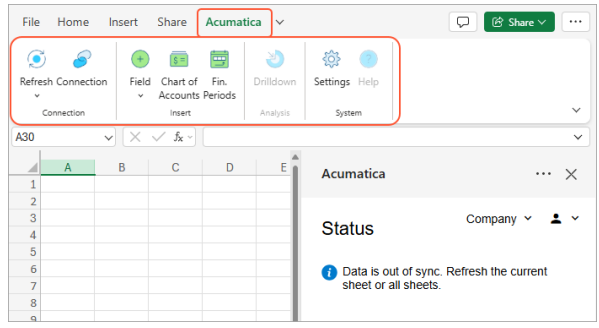
Acumatica Insight XL is an Excel add-in that allows Microsoft Excel to retrieve ERP data directly from Acumatica Cloud ERP.
The feature was introduced in the Acumatica 2026 R1 release to improve financial reporting and data analysis.
With Acumatica Insight XL, users can:
- connect Excel directly to Acumatica Cloud ERP
- retrieve ERP data using Excel functions
- build financial reports inside Excel
- refresh ERP data in real time
Instead of exporting ERP reports to spreadsheets, Excel becomes a live reporting interface for Acumatica data.
View more: How to Configure AI Studio in Acumatica – Step-by-Step Guide
How Does Acumatica Insight XL Work?
Acumatica Insight XL works through an Excel add-in that connects Microsoft Excel to an Acumatica ERP instance.
The reporting workflow typically looks like this:
- Open Microsoft Excel
- Connect Excel to Acumatica Cloud ERP
- Use Insight XL functions to retrieve ERP data
- Build financial reports or analysis models
- Refresh the workbook to update ERP data
Using Acumatica Insight XL, Excel can retrieve ERP data such as:
- Chart of Accounts
- Financial periods
- General Ledger balances
- company financial performance metrics
When the Excel workbook refreshes, Insight XL pulls the latest data directly from the ERP system.
What Is Excel (Connected) in Acumatica 2026 R1?
Excel (Connected) is another Excel reporting feature introduced in Acumatica 2026 R1 that allows financial reports to open in Excel with a live ERP connection.
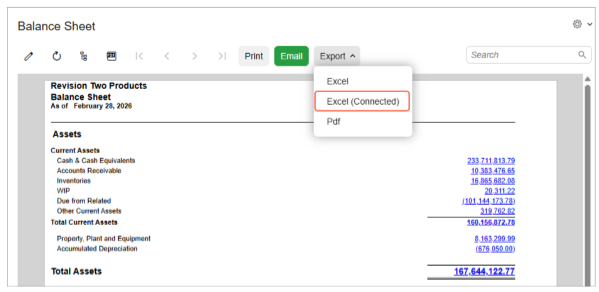
Instead of exporting a static report, the Excel workbook remains linked to Acumatica Cloud ERP data.
This allows users to refresh reports and retrieve the most recent financial data without manually exporting reports again.
Excel (Connected) is especially useful for analyzing:
- balance sheets
- income statements
- financial performance reports
Together with Acumatica Insight XL, this capability improves how finance teams work with ERP data in Excel.
Acumatica Insight XL vs Velixo
Before Acumatica Insight XL was introduced, many companies relied on Velixo for Excel-based reporting in Acumatica.
Both tools connect Excel to ERP data, but they focus on different use cases.
| Feature | Acumatica Insight XL | Velixo |
|---|---|---|
| Integration type | Native Acumatica feature | Third-party Excel add-in |
| Live ERP data | Yes | Yes |
| Excel financial reporting | Yes | Yes |
| Advanced financial modeling | Limited | Extensive |
| Write-back to ERP | Not supported | Supported |
| Budget & forecast entry | No | Yes |
Acumatica Insight XL focuses on standard Excel reporting, while Velixo remains a powerful tool for advanced financial modeling and budgeting scenarios.
What Are the Benefits of Acumatica Insight XL?
Acumatica Insight XL improves ERP reporting by allowing Excel to retrieve live data from Acumatica Cloud ERP.
Key benefits include:
Real-time financial reporting
Excel reports can refresh automatically with the latest ERP transactions and balances.
Flexible reporting with Excel
Finance teams can use familiar Excel capabilities such as:
- formulas
- pivot tables
- charts
- financial models
Reduced manual exports
Instead of exporting reports from ERP systems, Insight XL keeps Excel connected directly to ERP data.
Faster financial analysis
Because data is refreshed directly from Acumatica, finance teams can analyze performance and respond to business changes more quickly.
Why Acumatica Insight XL Matters for ERP Reporting
Acumatica Insight XL reflects a broader trend in ERP systems: integrating Excel directly with ERP data instead of replacing spreadsheets.
Finance teams often rely on Excel for financial analysis. By connecting Excel directly to ERP data, Acumatica allows organizations to combine spreadsheet flexibility with enterprise data accuracy.
This approach supports modern financial management practices such as:
- real-time financial reporting
- faster management reporting cycles
- improved financial visibility
FAQ
What is Acumatica Insight XL?
Acumatica Insight XL is an Excel integration introduced in Acumatica 2026 R1 that allows Microsoft Excel to retrieve ERP data directly from Acumatica Cloud ERP.
Does Acumatica Insight XL support real-time ERP data?
Yes. Excel workbooks connected through Insight XL can refresh and retrieve the latest ERP data from Acumatica.
Is Acumatica Insight XL a replacement for Velixo?
No. Insight XL focuses on standard ERP reporting in Excel, while Velixo supports more advanced financial modeling and write-back capabilities.
Why is Excel integration important in ERP systems?
Many finance teams prefer Excel for analysis and reporting. Integrating Excel directly with ERP data allows organizations to maintain spreadsheet flexibility while ensuring accurate financial data.