


Acumatica Shop Floor Kiosk: How to Deploy
Acumatica Shop Floor Kiosk is a new capability introduced in Acumatica 2026 R1 that allows manufacturers to capture production data directly on the shop floor through a simplified kiosk interface.
Instead of using complex ERP screens, operators can quickly report production progress, labor time, and completed quantities at a workstation located near the production line.
The goal of the Acumatica Shop Floor Kiosk is to bring ERP data collection closer to the production environment, enabling real-time visibility into manufacturing operations without requiring operators to interact with the full ERP interface.
For production leaders, implementing this feature is less about system configuration and more about designing an effective shop floor reporting process.
What Is Acumatica Shop Floor Kiosk?
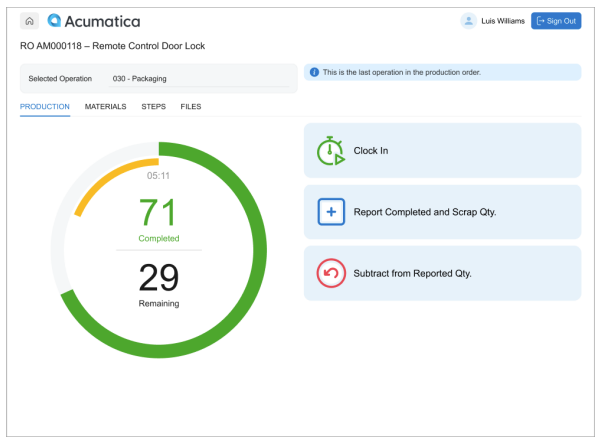
Acumatica Shop Floor Kiosk is a lightweight shop floor interface designed for production operators.
It enables workers to record manufacturing activity in real time using a simplified workflow.
Key capabilities of the Acumatica Shop Floor Kiosk include:
- selecting production orders and operations
- clocking in and out of production tasks
- reporting completed quantities and scrap
- issuing materials for operations
- viewing work instructions and documents
- reviewing recent operator activity.
Because the interface is designed for shop floor use, operators only see tasks relevant to their work center and role, which minimizes training and reduces data entry errors.
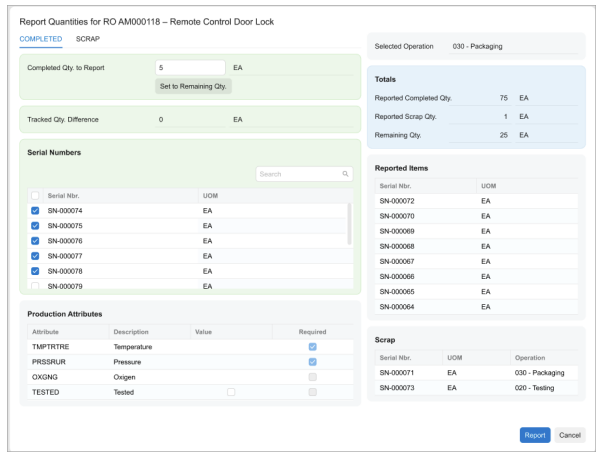
Acumatica Shop Floor Kiosk vs Manufacturing Data Collection
Before the introduction of the Acumatica Shop Floor Kiosk, most manufacturers used Manufacturing Data Collection to enter production data.
Both tools support shop floor reporting, but they are designed for different operational scenarios.
| Feature | Acumatica Shop Floor Kiosk | Manufacturing Data Collection |
|---|---|---|
| Interface | Simplified kiosk interface | Standard ERP screen |
| Typical user | Production operators | Supervisors or production clerks |
| Deployment | Terminal at work centers | Office workstation |
| Workflow complexity | Minimal | More detailed data entry |
| Main objective | Real-time shop floor reporting | Recording production data in ERP |
In many implementations, the two features can complement each other.
The Acumatica Shop Floor Kiosk captures data directly on the shop floor, while Manufacturing Data Collection allows supervisors to review or adjust production transactions within the ERP system.
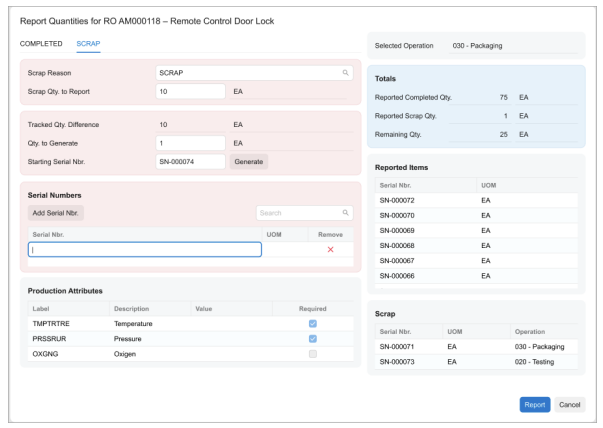
Why Manufacturers Deploy Acumatica Shop Floor Kiosk
In many factories, production data is still collected manually.
Typical workflow:
- operators record production on paper
- line leaders summarize the data
- production clerks enter the information into the ERP system later.
This approach creates several operational challenges:
- production data is delayed by several hours
- supervisors lack real-time visibility
- discrepancies often occur between shop floor activity and ERP records.
The Acumatica Shop Floor Kiosk solves these problems by enabling production reporting directly at the work center.
This creates a continuous flow of manufacturing data into the ERP system.
Determining Where to Place Shop Floor Kiosks
The Acumatica Shop Floor Kiosk is typically deployed at key production areas such as work centers or production cells.
Common deployment models include:
Kiosk per work center
| Work Center | Kiosk |
|---|---|
| CNC machining | 1 |
| Assembly | 1 |
| Packaging | 1 |
Kiosk per production line
A single kiosk serves multiple operators working on the same line.
The most important deployment principle is accessibility.
Operators should be able to report production activity within seconds without interrupting their work.
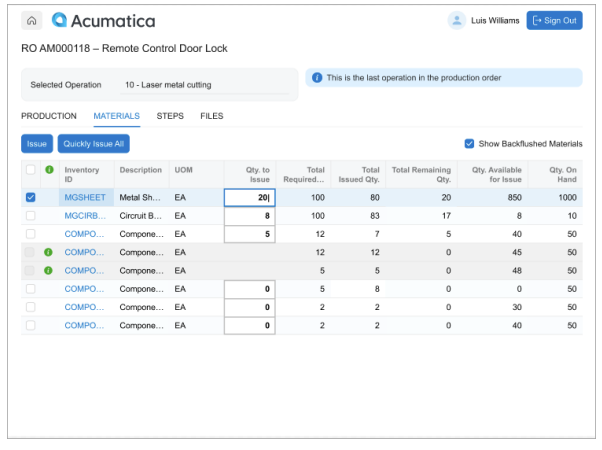
Hardware Considerations for Shop Floor Kiosk Deployment
The Acumatica Shop Floor Kiosk runs in a web environment, so hardware requirements are relatively simple.
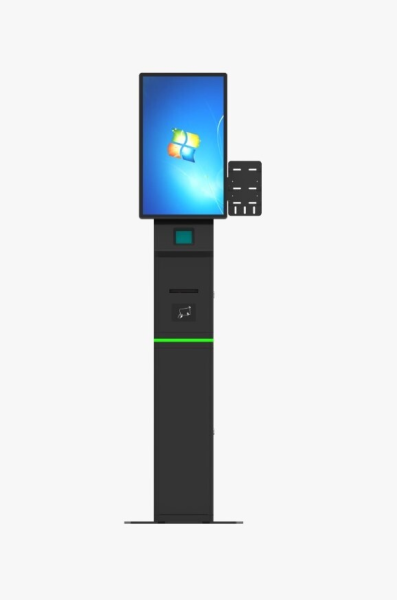
Typical shop floor setups include:
Industrial PCs
- suitable for environments with dust or vibration
- mounted near production equipment.
Tablets or touch screens
- useful in flexible production cells
- easy to move or reposition.
Barcode scanners (optional)
Some manufacturers use scanners to speed up data entry for:
- production orders
- employee IDs
- lot or serial numbers.
For example, an operator may scan a production order barcode before starting an operation.
Running a Pilot Before Full Deployment
A best practice when implementing Acumatica Shop Floor Kiosk is to start with a pilot area.
Typical pilot scope:
- one production line
- one work center
- one department.
The pilot phase allows the production team to evaluate:
- operator adoption
- reporting speed
- data accuracy.
A pilot usually runs for two to four weeks before expanding the solution to additional production areas.
Training Production Operators
One of the main advantages of the Acumatica Shop Floor Kiosk is the minimal training required.
Operators typically only need to learn three actions:
- select an operation
- clock in and out
- report completed quantities.
Training sessions are usually conducted directly on the shop floor to ensure operators become comfortable with the kiosk workflow.
Benefits of Acumatica Shop Floor Kiosk
When deployed successfully, the Acumatica Shop Floor Kiosk can significantly improve manufacturing visibility.
Real-time production data
Managers can monitor production activity as it happens rather than waiting for end-of-shift reports.
More accurate labor tracking
Operators record their time directly in the system, improving cost tracking.
Reduced manual data entry
Production clerks no longer need to re-enter data from paper reports.
Better operational control
Supervisors can quickly identify production bottlenecks or abnormal scrap rates.
Conclusion
The Acumatica Shop Floor Kiosk, introduced in Acumatica 2026 R1, represents an important step toward real-time manufacturing data collection.
By bringing ERP data entry closer to the production environment, manufacturers can replace delayed reporting with immediate operational visibility.
For production leaders, the key to success is not only enabling the technology but also designing the right shop floor workflow and deployment strategy.
FAQ
What is Acumatica Shop Floor Kiosk?
Acumatica Shop Floor Kiosk is a shop floor interface introduced in Acumatica 2026 R1 that allows production operators to report manufacturing activity directly at the work center.
Is Acumatica Shop Floor Kiosk a replacement for Manufacturing Data Collection?
Not necessarily. Shop Floor Kiosk focuses on operator-level reporting, while Manufacturing Data Collection is often used by supervisors or production clerks.
Do operators need ERP accounts to use Acumatica Shop Floor Kiosk?
No. The kiosk interface is designed to simplify operator interaction and does not require full ERP access.
Where should a shop floor kiosk be installed?
Most manufacturers place kiosks near work centers or production lines where operators can easily report production activity.
View more: Acumatica Insight XL: Excel Reporting in Acumatica 2026 R1