


Where to Download Acumatica 2026 R1 and Choose the Right Package
Acumatica 2026 R1 can be downloaded directly from the official build repository. There are two types of packages, and choosing the correct one is critical for a successful upgrade or deployment.
Where can you download Acumatica 2026 R1?
You can access the official files here:
- Update package (for in-app upgrade):
https://acumatica-builds.s3.amazonaws.com/index.html?prefix=builds/26.1/26.100.0175/Packages/ - Full installation package (for server installation or fallback):
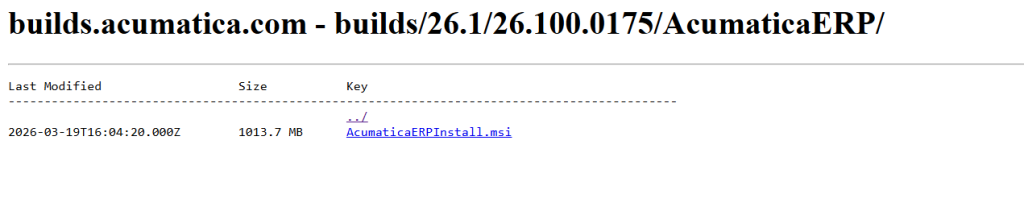
https://acumatica-builds.s3.amazonaws.com/index.html?prefix=builds/26.1/26.100.0175/AcumaticaERP/
Which package should you choose?
Short answer:
- Use Packages if you are upgrading inside Acumatica (via SM203510)
- Use AcumaticaERP if you are installing a new instance or fixing a failed upgrade
Each package serves a different purpose, and using the wrong one will cause issues during upgrade.
What is inside each package?
Packages folder:
- Contains
ErpPackage.zip - Used in Apply Updates (SM203510)
- Lightweight and faster for standard upgrades
AcumaticaERP folder:
- Contains full installer (.exe)
- Includes application and database upgrade components
- Required for server-level upgrade or recovery
When should you use the full installer?
Use the full installer in these cases:
- Apply Updates fails
- Database upgrade error occurs
- Large version jump
- System has heavy customization
In real implementations, many upgrade issues are resolved only after switching to the full installer and running upgrade via Configuration Wizard.
What should you check before downloading?
- Confirm target build: 26.100.0175 or later
- Make sure all environments use the same build
- Prepare full database backup before upgrade
Practical experience from real projects
In many ERP projects in Vietnam, upgrade issues are often caused by simple mistakes:
- Uploading the wrong file (e.g., using .exe in SM203510)
- Mixing different builds
- Downloading incorrect package type
Selecting the correct package from the beginning significantly reduces upgrade risk and troubleshooting time.
FAQ
Do I need credentials to download Acumatica builds?
No. The repository is public and accessible via direct link.
Can I use the full installer for upgrade instead of Packages?
Yes. This is often the safer approach for complex or customized systems.
Which file should be uploaded in Acumatica?
Use ErpPackage.zip in the Apply Updates screen.
What happens if I use the wrong version?
You may encounter upgrade failure or database mismatch errors.
How to Upgrade to Acumatica 2026 R1 to Use AI Assistant and Shop Floor Kiosk