

eSuite AP Automation for Oracle NetSuite Vietnam AP Bill Automation for Oracle NetSuite.
Vietnamese purchase e-invoices sync into NetSuite and are matched to vendors, items and purchase orders. Accountants review and create the transaction on one screen, while invoices that are not ready are blocked for review before posting.
Watch the AP invoice process in Oracle NetSuite
A 3-minute demo on an Oracle NetSuite environment with demo data, from e-invoices syncing into the Invoice Inbox to Vendor Bills, Vendor Credits, controls and reports.
From e-invoice to posted transaction.
Four steps in one system, so accountants never re-key invoice data.
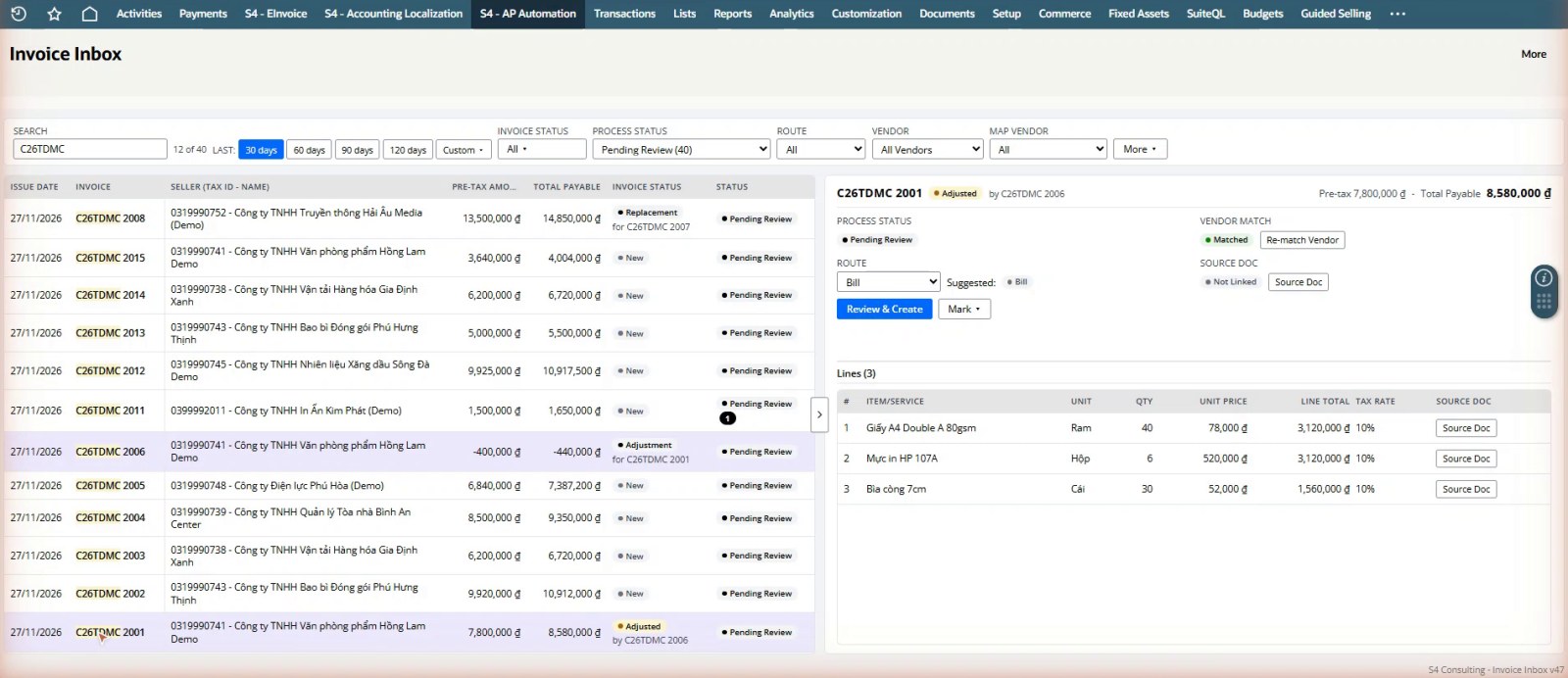
E-invoices sync into Oracle NetSuite
The application connects via API to e-invoice service providers such as Mat Bao. Purchase invoices sync into NetSuite per buyer tax ID, with the original XML and PDF, and land in one Invoice Inbox.
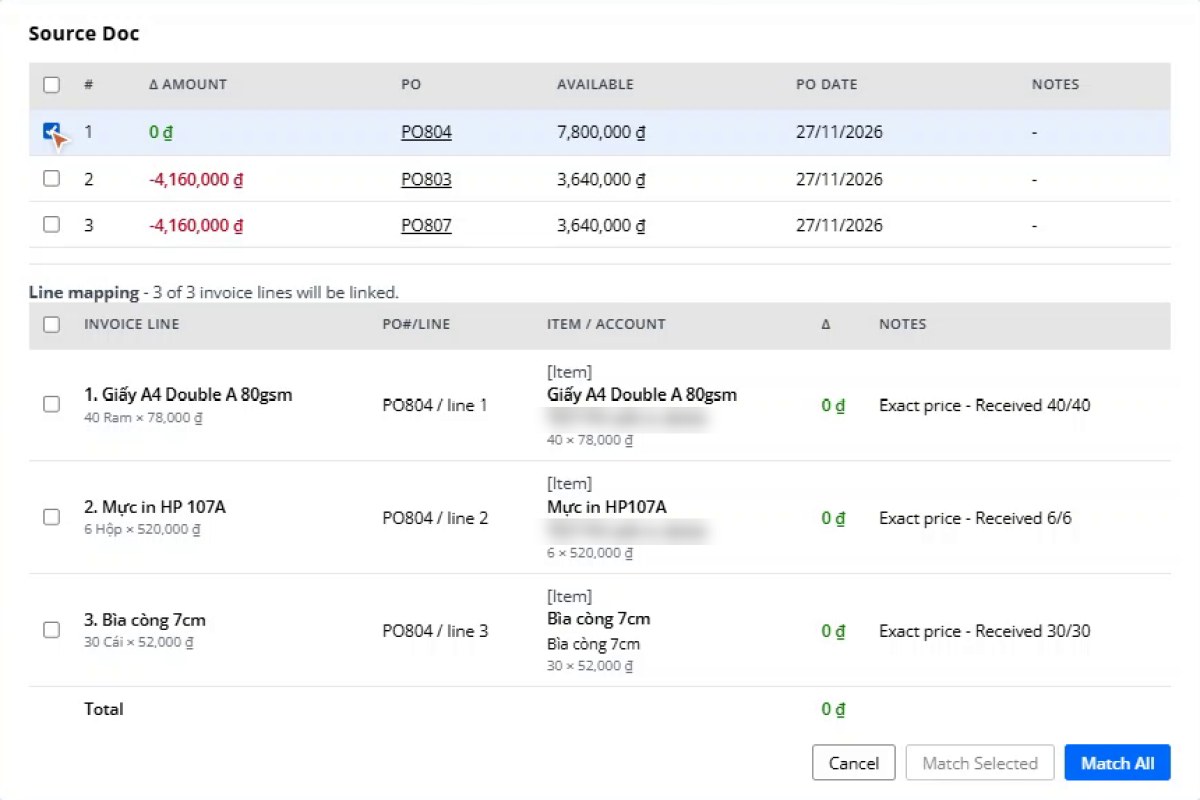
Map each invoice line to the purchase order
For invoices against a PO, the system finds open purchase orders, ranks the best match first and maps each invoice line to its PO line, with the quantity already received. Items are matched by code and name, and tax rates are mapped automatically.
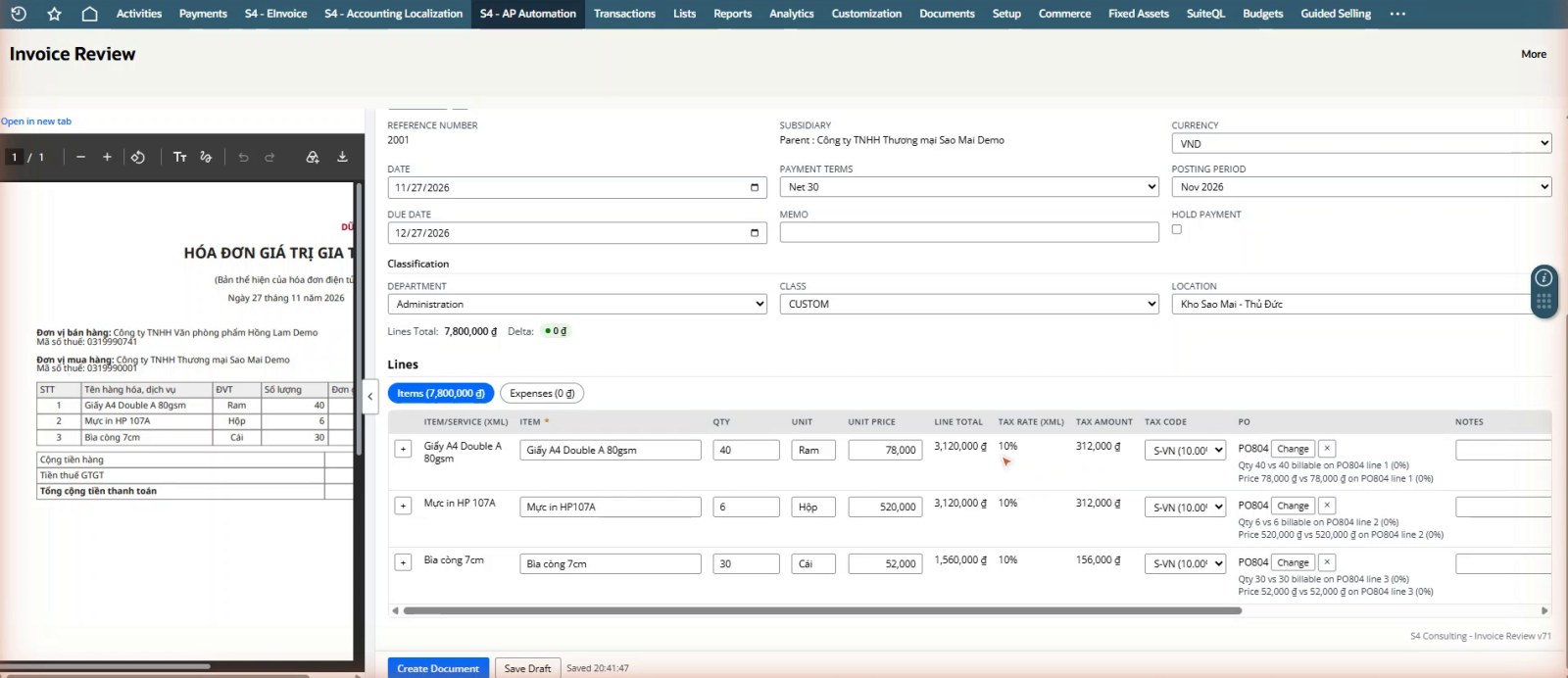
Review and create on one screen
The review screen shows the invoice PDF next to the data to be posted. Accountants create a Vendor Bill with or without a PO, a Check, or a Vendor Credit applied to the original bill. For invoices with several tax rates, the tax code is filled in per line.
Control invoices before posting, follow up in reports
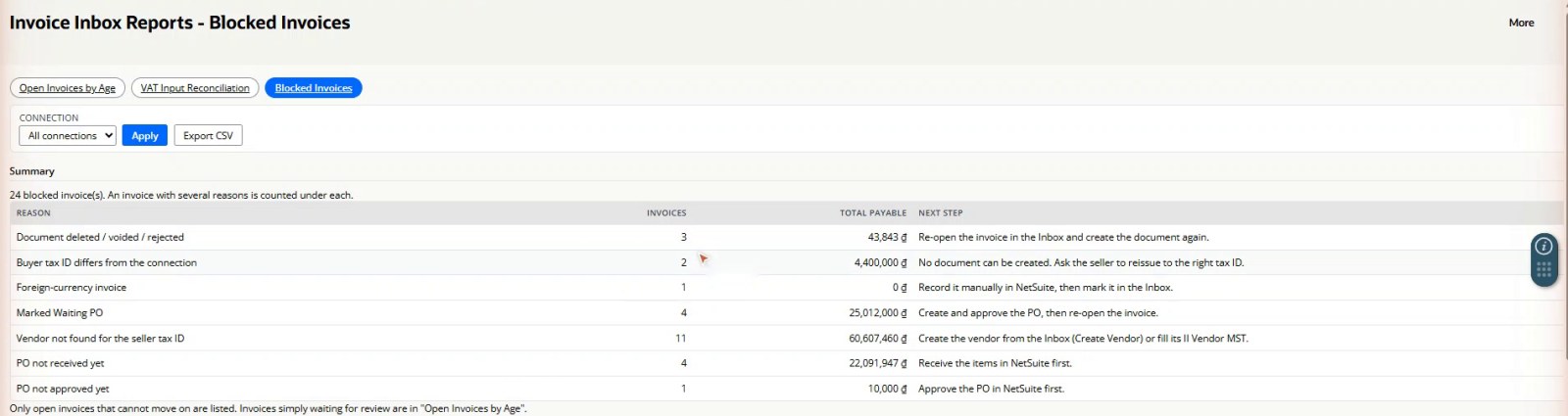
Invoices with a wrong buyer tax ID, replaced invoices and invoices from vendors not yet in the system are blocked for review before posting. The Blocked Invoices report shows the reason and the next step; the input VAT reconciliation report shows invoices issued in the month that are not yet recorded.
Five capability groups
From invoice capture to reporting, the whole AP invoice process runs inside Oracle NetSuite.
Automatic invoice capture
API connection to e-invoice providers such as Mat Bao; sync per buyer tax ID with the original XML and PDF; duplicate check, catch-up sync and alerts when the connection fails.
Smart matching
Vendors by tax ID, items by code and name, POs line by line; suggested transaction type; remembered for next time; quick Vendor and Item creation from invoice data.
One-screen transactions
Invoice PDF next to posting data; Vendor Bill with or without a PO, Check, Vendor Credit applied to the original bill; lot-tracked items supported.
Controls and compliance
Blocks invoices with a wrong buyer tax ID and replaced invoices; reason and audit trail when a warning is accepted; legal fields locked; detects deleted or voided transactions.
Reports, setup and AI assistants
Open invoices, blocked invoices and input VAT reconciliation reports, Excel export; setup detects your NetSuite configuration; works with browser-controlling AI assistants.
Three benefits for Oracle NetSuite customers in Vietnam
Less manual entry, a faster AP cycle
Invoices sync into NetSuite with the original XML and PDF, with vendors, items and POs already matched for review. The application remembers vendors and items, so repeat work goes down over time.
Tighter control before posting
Invoices with a wrong buyer tax ID, replaced invoices and invoices from unknown vendors are blocked for review. Every accepted warning has a reason and an audit trail for internal control and audit.
Clear view of payables and input VAT
Chief accountants see which invoices are pending, why they are blocked and what comes next. The input VAT reconciliation report shows invoices issued in the month that are not yet recorded, ahead of the VAT return.
Want to see it running on your own AP process?
Contact S4 for a solution demo of eSuite AP Automation on Oracle NetSuite and an implementation roadmap that fits your purchase invoice process.
Questions about Vietnam AP Bill Automation
Common questions about automating purchase invoices in Oracle NetSuite for companies in Vietnam.
What is Vietnam AP Bill Automation for Oracle NetSuite?
eSuite AP Automation is an application developed by S4 Consulting that integrates with Oracle NetSuite to sync Vietnamese purchase e-invoices, match them to vendors, items and purchase orders, and create transactions such as Vendor Bills, Checks and Vendor Credits. Accountants no longer re-key invoice data and can control invoices before posting.
How do invoices get into NetSuite?
The application connects via API to e-invoice service providers such as Mat Bao. Purchase invoices sync per buyer tax ID with the original XML and PDF, with a duplicate check and catch-up sync after connection gaps.
What happens to wrong or incomplete invoices?
The system blocks invoices with a wrong buyer tax ID, replaced invoices and invoices from vendors not yet in NetSuite for review before posting. For WARN-level alerts, the user must enter a reason to continue, and this is logged.
Can it create a Vendor Credit from a decrease adjustment invoice?
Yes. The application recognizes the adjustment invoice and links it to the original invoice. The accountant creates a Vendor Credit and applies it to the original Vendor Bill.
Which reports are included?
An open invoices by age report, a blocked invoices report with reasons and next steps, and an input VAT reconciliation report by invoice issue month. Reports export to Excel.

Need a trusted ERP partner in Vietnam? Let’s discuss your project!