


Visualize Your Integrations, Stay in Control of Every Operation.
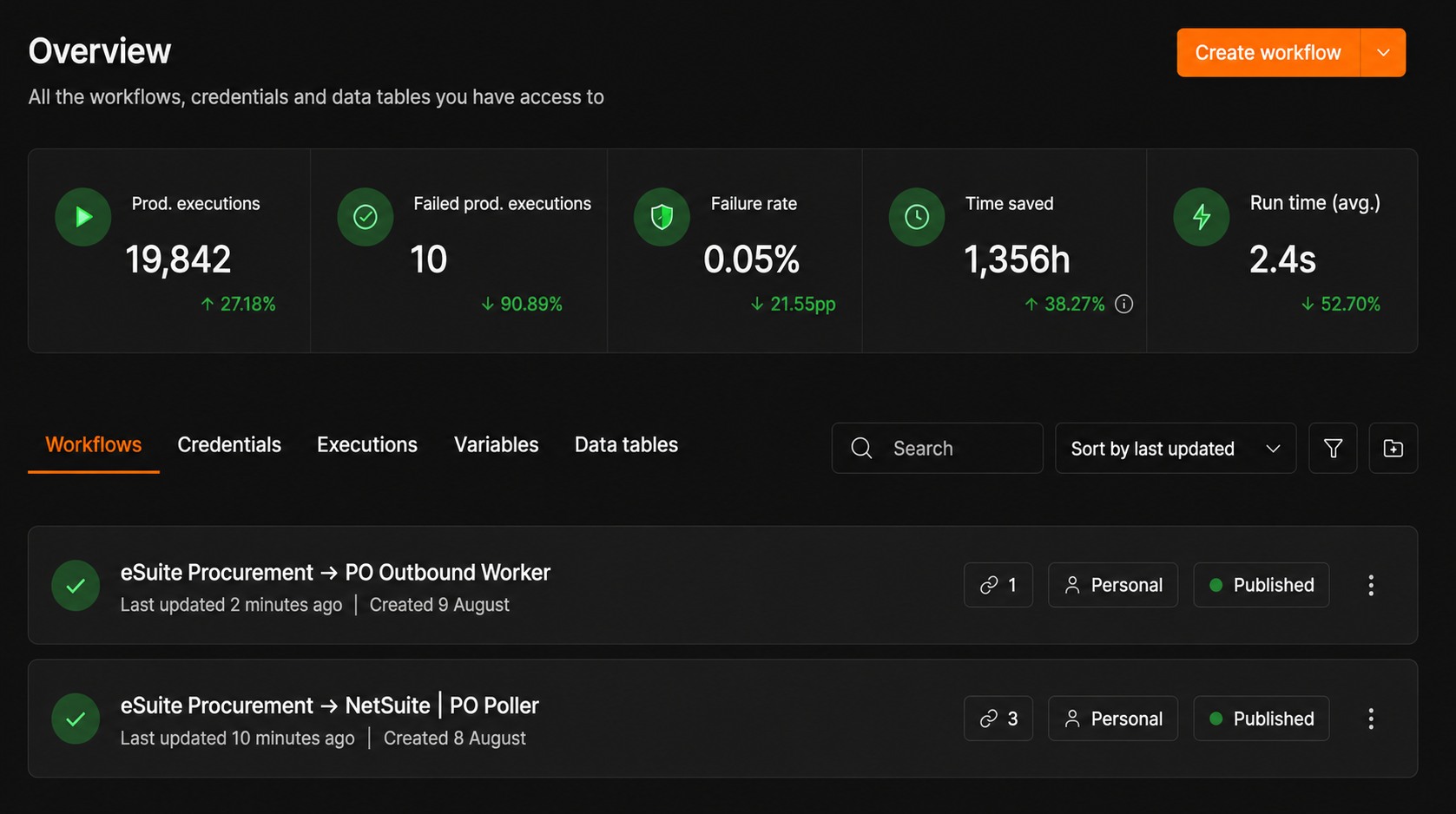
S4 builds integrations on an open-source No-Code/Low-Code platform, self-hosted on infrastructure your business controls. Every data flow is represented as a visual workflow, transparent across its entire lifecycle – from design and monitoring through change control.

Visual Workflow Design
Build integration flows with a drag-and-drop interface. Business teams can review and adjust directly, reducing dependence on any single technical person.
Real-Time Execution Monitoring
Track run counts, error rates, and processing time for every workflow. Catch and fix integration issues before they affect operations.
Centralized Credential Management
Connection details, API keys, and system accounts are stored and permissioned separately from the integration logic – easy to manage through staff or system changes.
Transparent Change History
Every workflow edit is fully logged. Your operations team knows exactly what changed and when, supporting quick audits and rollbacks.
Self-Hosted, No Vendor Lock-in
Runs on infrastructure controlled by your business or S4 – your data never has to pass through a third-party middleman platform.
Extend Flexibly with Code
For complex business logic, integrations let you add custom code directly inside the workflow – not limited to the drag-and-drop interface.
Seamless Integration with Leading ERP Systems
Ready to connect with the most popular ERP platforms, so you never have to replace your core system.




Integration Upgrade Project
Loyverse POS x AcumaticaAn Nhiên Cafe Modernizes Its POS-ERP Integration
Integrations Built Around Your Business, Without Adding Risk to Your ERP
A good integration project is more than just connecting two systems. S4 starts from finance and accounting logic, picks techniques that are safe for the ERP core, and hands over a system your team can run independently for the long term.
Deep Knowledge of ERP and Finance/Accounting
S4’s team comes from ERP implementation consulting, understanding the underlying logic of AR/AP/GL, inventory, and costing – not just connecting APIs, but making sure accounting data stays accurate and consistent across systems.
Techniques That Stay Out of the ERP Core
We prioritize connecting through each platform’s standard APIs and webhooks, minimizing customization to the ERP core. That means a more stable system and lower maintenance and upgrade costs.
No-Code/Low-Code Platform
Every integration flow is a visual workflow, easy to monitor and adjust. Your team stays in control, instead of depending on code only one technical person can understand.
Handed Over for You to Run Yourself
S4 hands over the complete workflows, documentation, and trains your internal team. You run, monitor, and extend the integration going forward – without depending on S4 or any implementation partner.
Frequently Asked Questions About ERP Integration
Common questions businesses ask when considering integrating Oracle NetSuite, Acumatica, SAP Public Cloud, Oracle Fusion, or Dynamics 365 with other systems.
What is third-party ERP integration?
ERP integration connects your ERP system (Oracle NetSuite, Acumatica, SAP Public Cloud, Oracle Fusion, Dynamics 365, etc.) with other systems you run – POS, MES, accounting software, e-invoicing, or e-commerce platforms – so data syncs automatically both ways instead of being entered manually.
Which ERP platforms does S4 support integrating?
S4 implements and integrates Oracle NetSuite, Acumatica, SAP Public Cloud, Oracle Fusion, and Microsoft Dynamics 365 with third-party systems like POS, MES, Misa AMIS, e-invoicing, and e-commerce platforms.
Does ERP integration require customizing the ERP core?
Mostly, no. S4 prioritizes connecting through each platform’s standard APIs and webhooks, minimizing ERP core customization. This approach keeps the system more stable and lowers costs when upgrading ERP versions later.
How does the No-Code/Low-Code platform work in ERP integration?
Each data flow is built as a visual workflow instead of hand-written code. You can track execution history and error rates, and adjust the workflow as your business changes, without rewriting the entire integration.
How long does an ERP integration project take?
Timing depends on how many systems need to be connected, how complex the business logic is, and how ready the third-party system’s API is. S4 will assess your setup and provide a specific roadmap after the initial consultation.
Can we run the integration ourselves after implementation?
Yes. S4 hands over the complete workflows, operating documentation, and trains your internal team so you can monitor, troubleshoot, and extend the integration going forward – without depending on S4 or any implementation partner.
Does S4 integrate NetSuite or Acumatica with Misa AMIS and e-invoicing?
Yes. This is one of the use cases S4 has implemented – two-way sync between a central ERP and Misa AMIS for subsidiary units, plus automatically pulling and reconciling e-invoices from the Tax Authority into the ERP.
Ready to Connect Your ERP with the Systems You Run?
Talk to S4 for the right integration approach – from POS and MES to Misa AMIS, e-invoicing, and e-commerce platforms.

Need a trusted ERP partner in Vietnam? Let’s discuss your project!