




What Is NetSuite? A Beginner’s Guide to NetSuite ERP
What is NetSuite? NetSuite (Oracle NetSuite) is Oracle’s fully cloud-based ERP system. It lets a business run finance and accounting, sales, purchasing, inventory, manufacturing, projects and e-commerce on one platform and one shared database. There are no servers to buy: companies pay an annual subscription and work from any web browser.
This guide is for people who are new to NetSuite. It explains what the system really is, walks through the interface and core processes, clears up the terms beginners most often misread, and lays out a 30-day plan to become confident working in NetSuite.
For an overview of NetSuite modules, pricing and how NetSuite works together with S4 eSuite, see What is Oracle NetSuite? Overview and the NetSuite+E solution. This article goes deeper into “learning it right” for new users: accountants, controllers, operations staff and managers getting ready to use NetSuite.
1. What is NetSuite ERP?
NetSuite is a cloud ERP system from Oracle (USA), built from day one as software as a service (SaaS). Unlike on-premise ERP, all data and applications run on Oracle’s infrastructure, so users only need a browser and an account. Every module shares one database: a sales order immediately updates inventory, receivables and the general ledger, with no reconciliation between separate systems.
Four differences beginners should remember
Runs entirely in the cloud
No installation, no servers, no self-managed upgrades. Oracle ships a new release twice a year and applies it automatically.
One database for every subsidiary
Sales, warehouse, purchasing, projects and finance share the same data, even across multiple legal entities with NetSuite OneWorld.
Strongest at the financial core
Multi-company, multi-currency, multiple accounting standards and group consolidation are the strengths Oracle highlights most.
Role-based user interface
Each role (accountant, controller, sales, warehouse) has its own dashboard, menus and permissions, so new users only see what their job needs.
How is NetSuite sold in Vietnam?
In Vietnam, NetSuite is sold in two ways: the global edition, licensed module by module, and the SuiteSuccess Financials First bundle for companies that want to start quickly with the financial core. NetSuite’s HRM and POS modules are not currently sold directly in Vietnam, so companies usually add an external solution or extension packages such as S4 eSuite.
Key milestones
- 1998: NetSuite is founded (originally as NetLedger), one of the first companies to bring ERP to the cloud.
- 2016: Oracle completes its acquisition of NetSuite for about USD 9.3 billion; NetSuite becomes an Oracle business unit.
- October 2025: At SuiteWorld 2025, Oracle announces NetSuite Next, with conversational AI and agentic workflows built deep into the system.
- Today: Oracle reports more than 43,000 NetSuite customers in 219 countries and territories.
2. What does the NetSuite interface look like for beginners?
The NetSuite interface revolves around three things new users touch every day: the role-based Dashboard, the Navigation Center menu and Global Search. Getting comfortable with these three in the first week makes new users far more productive than trying to memorize the entire menu tree.
2.1. The NetSuite Dashboard: your home screen after login
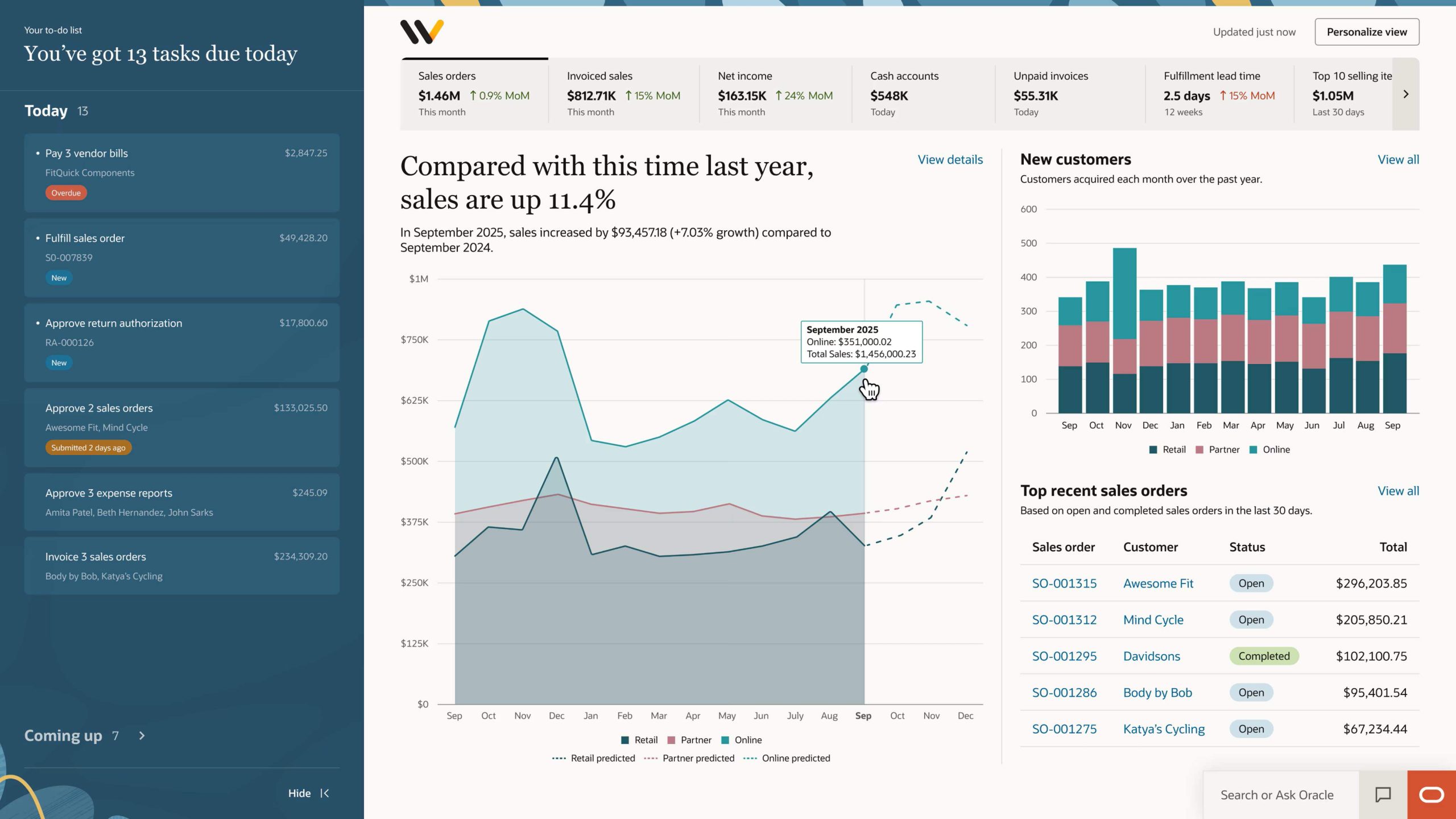
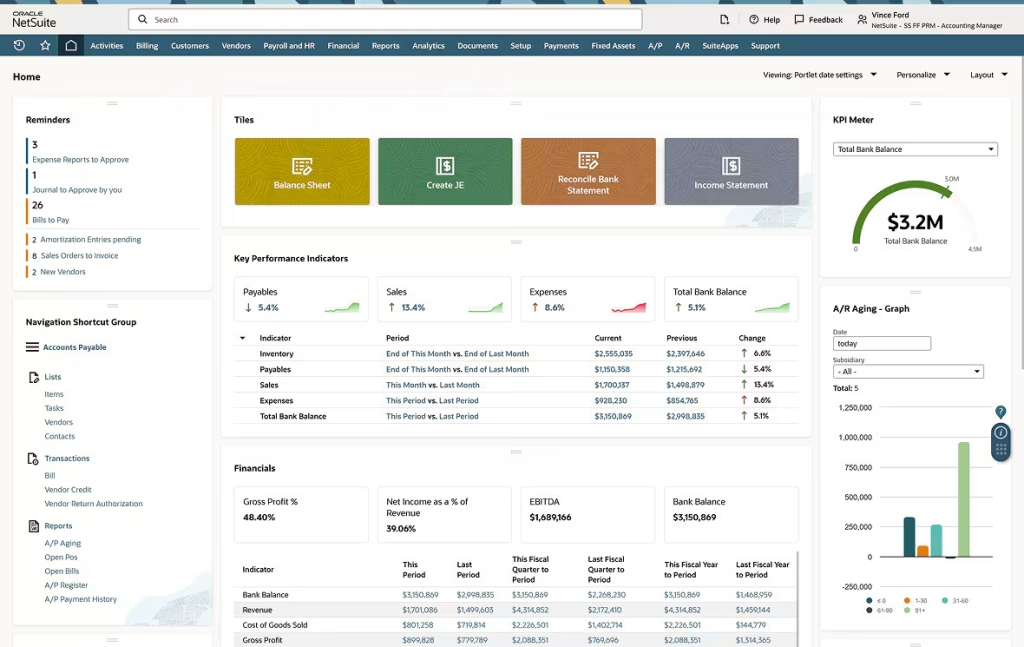
Every user gets a dashboard for their role: accountant, controller, sales manager, warehouse manager. It is built from portlets such as KPIs, financial metrics, reminders, shortcuts and lists of items waiting for action. Users can add, remove and drag portlets and change the layout to suit how they work.
The most valuable part of a NetSuite dashboard is the trend charts and period-over-period comparisons. They help managers spot early signals such as costs growing faster than revenue, cash flow shrinking or receivables swelling unusually. From any KPI, users can drill down to the detailed report and the source transaction, without exporting to Excel.
2.2. Navigation Center: the main menu
The menu gives access to the whole system through groups such as Transactions, Lists, Reports, Saved Searches, Inventory and Accounting. What sets NetSuite apart is that each role has its own menu structure, designed around how end users actually work, so an accountant is not distracted by unrelated manufacturing or sales menus.

2.3. Global Search: search across the whole system
Global Search finds any record from just a few characters: an invoice number, a customer name, a PO number, an item code, an employee. In real implementations, most users rely on Global Search more than the menu: accountants type an invoice number to check a document, buyers look up POs by vendor, and managers jump straight to a customer or contract in progress.
cus: for customers, inv: for invoices) and use the % wildcard to narrow results once your data grows.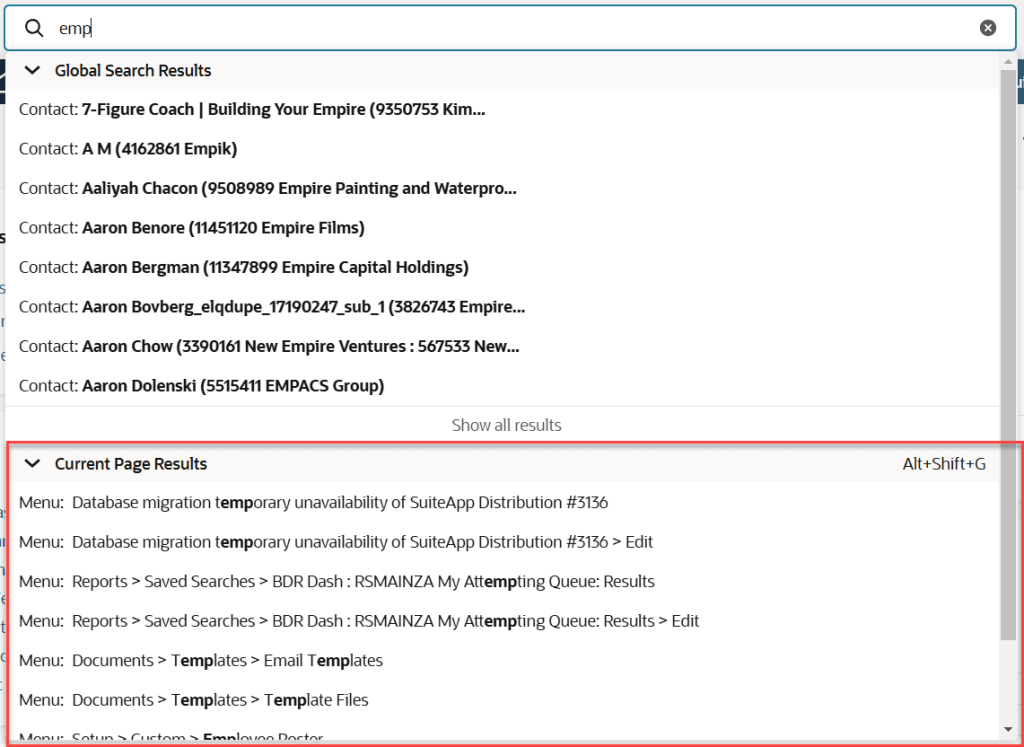
3. How does NetSuite run business processes?
Whether you are new or experienced, the most important thing to understand about NetSuite is that it runs on chains of linked transactions. Each transaction is created from the previous one, carries its data forward and automatically generates accounting entries (GL Impact). Learning process by process is much easier than learning isolated screens.
3.1. Order to Cash: from sales order to payment
In NetSuite, order management is not a separate module: it is part of Core ERP through the Order to Cash process. Users create sales orders, manage basic pricing and discounts, fulfill from inventory, invoice, recognize revenue and track receivables. Every step connects directly to inventory and the general ledger, so figures stay in sync in real time. For deeper management from lead to after-sales service, NetSuite CRM adds opportunities, quotes and customer service.
3.2. Procure to Pay: from purchase order to payment
Procure to Pay is built into Core ERP: from purchase order and receipt to vendor bill, with inventory, purchase costs and payables posted in real time. When tighter control is needed, companies add Procurement for spend, purchase contracts and approvals; Demand Planning for forecasting; and Inventory Management and WMS for multi-warehouse, barcode, picking and packing.
3.3. The financial engine: NetSuite’s strongest core
Financial management sits at the center of NetSuite: every sales, purchasing, inventory and project transaction flows straight into the books. The foundation covers the general ledger, receivables, payables, inventory accounting and real-time financial reporting. As the business grows, NetSuite OneWorld handles multiple subsidiaries, multiple currencies and group consolidation, while advanced modules add budgeting, cost allocation, complex billing and fixed asset management.
3.4. How does manufacturing work in NetSuite?
Manufacturing in NetSuite is designed in tiers, so companies implement only the complexity they need. At the base level, Work Orders and Assemblies support assembly and make-to-order production with multi-level BOMs. As volume grows, WIP and Routings manage production by operation and work center with real-time work-in-progress costing, and Quality Management adds shop-floor quality control.
3.5. What do Project Management and Job Costing deliver?
For service and project-based companies, NetSuite Project Management supports estimates, tasks and phases, time tracking and resource utilization. Every cost from time entries, vendor bills or materials is posted to the ledger and tied to a project and task, so the business sees project profitability while work is still under way and catches budget overruns early.
4. Which NetSuite terms do beginners need to get right?
Most beginners struggle with terminology rather than clicks. NetSuite uses one consistent set of concepts across every module, so understanding the dozen or so terms below helps users read documentation, talk with consultants and find their way around unfamiliar screens.
| Term | Meaning |
|---|---|
| Record | A unit of data: customer, vendor, item, invoice… Everything in NetSuite is a record. |
| Transaction | A record with accounting impact, such as a Sales Order, Invoice, Vendor Bill or Journal Entry. |
| GL Impact | The ledger entries a transaction generates automatically; visible on every document. |
| Subsidiary | A legal entity in NetSuite OneWorld, with its own currency and accounting periods. |
| Role | The user role: it decides the permissions, menus, dashboard and forms a user sees. |
| Field / Form | A data field in a record / the data entry layout, customizable per role. |
| Sublist | The list of detail lines inside a record, such as the item lines of a sales order. |
| Saved Search | A user-defined data query used as a report, list or alert; the skill to learn first. |
| Portlet | A dashboard tile: KPI, chart, reminder or shortcut. |
| Workflow (SuiteFlow) | Approval and automation flows built with a point-and-click designer, no coding needed. |
| SuiteScript / SuiteCloud | NetSuite’s customization and development platform; upgrades keep customizations intact. |
| SuiteApp | An add-on application installed into NetSuite, from Oracle or third-party developers. |
| Sandbox | A test environment separate from live data, used for training and testing. |
| Process Flow | The chain of linked transactions in a process such as Order to Cash or Procure to Pay. |
5. What should a beginner learn in the first 30 days?
The plan below is S4 Consulting’s suggestion for business users (accounting, purchasing, sales, warehouse) starting work in NetSuite. The principle is to learn by role and by process, practicing in a Sandbox with your own company’s data, rather than studying the whole system in theory.
Log in, switch roles, personalize the dashboard, use Global Search, understand records and transactions.
Run a full transaction chain for your role: Order to Cash, Procure to Pay or warehouse tasks. Review the GL Impact of each document.
Build your first Saved Search, filter and export data, add KPIs to the dashboard, drill down from reports to source documents.
Approve documents through workflows, reconcile balances, take part in the period close and read the financial statements.
After 30 days, users should handle their daily transactions independently and build simple Saved Searches on their own. Advanced topics such as workflows, form customization and SuiteScript are best left to key users and consultants.
6. Does NetSuite meet Vietnamese accounting requirements?
Standard NetSuite presents books and reports according to international practice, so companies using it in Vietnam face gaps against Vietnamese Accounting Standards (VAS) and Circular 99/2025/TT-BTC, which applies from fiscal year 2026. Beginners should know these gaps early so the statutory reporting period does not come as a surprise.
Corresponding accounts
Multi-line NetSuite journal entries do not carry the paired debit/credit accounts that Vietnamese ledgers require.
Period-end closing entries
NetSuite does not close the period through account 911 the way Vietnamese accounting does.
Statutory books and reports
There are no built-in S-DN books or B01-DN to B09-DN reports in the Circular 99 formats.
Tax and vouchers
There is no built-in handling of non-deductible expenses for corporate income tax, or Vietnamese receipt and payment vouchers.
S4 Consulting has developed an accounting localization package that produces statutory books, financial statements, notes and tax forms under Circular 99 directly in NetSuite, from the same data used for management. See NetSuite financial localization for Vietnam for details, or watch the demo below.
7. Which companies is NetSuite a good fit for?
NetSuite fits growing companies best: businesses that need a finance system running in real time and expect to add subsidiaries, branches or sales channels without replacing software. In S4’s implementation experience, the following groups tend to get the most out of NetSuite.
Trading and distribution
Orders, multi-warehouse inventory, receivables and cost of goods in real time.
Light manufacturing, assemble to order
Work orders, multi-level BOMs and costing connected directly to accounting.
Professional services
Projects, timesheets, billing and profit and loss by contract.
E-commerce
Orders, inventory and revenue synchronized across channels.
Multi-entity groups, FDI subsidiaries
Consolidation, multi-currency and parent-company reporting to group standards.
Fast-growing companies
Replace standalone accounting software before scale outgrows it.
On the other hand, very small companies, businesses without stable processes, or those that only need basic accounting software should weigh the cost and their readiness carefully before choosing NetSuite. The Oracle NetSuite overview page includes signs that a company is ready.
8. How much does a NetSuite subscription cost?
NetSuite subscription costs for customers in Vietnam typically range from about USD 20,000 to about USD 100,000 per year, depending on the number of users, subsidiaries, modules and transaction volume. On top of the subscription, companies should budget for implementation services, usually 1.5 to 3 times the first-year subscription.
| Component | What beginners should know |
|---|---|
| Base package | Core ERP or a SuiteSuccess bundle, paid as an annual subscription. |
| Users | Priced per full-access user; some roles have their own license types. |
| Add-on modules | OneWorld, WMS, Manufacturing, Projects… added when needed. |
| Implementation | Consulting, configuration, data migration, training and go-live support. |
For a detailed breakdown, see How to estimate Oracle NetSuite implementation costs in Vietnam. Companies with many light users (purchase requests, payment requests, expenses) can reduce the number of NetSuite licenses they need with S4 eSuite packages.
9. What should beginners know about AI in NetSuite?
AI is becoming part of how people work in NetSuite. At SuiteWorld in October 2025, Oracle announced NetSuite Next, with conversational AI (Ask Oracle), the AI Canvas workspace and agentic workflows that help with payment proposals, reconciliation and supplier selection. According to Oracle, NetSuite Next will be available to North American customers first, and the timeline may change.
Today, NetSuite users can already connect ChatGPT or Claude to their NetSuite data through the NetSuite AI Connector Service (using the MCP protocol), within the permissions they have been granted, to query data in plain language, reconcile and find exceptions. For beginners, the key principle remains the same: understand records, processes and permissions first, because AI only works well when users know what data they are asking about.
See the S4 Consulting webinar Using ChatGPT/Claude with Oracle NetSuite: practical tips to lighten the accounting workload.
10. How does S4 Consulting support new NetSuite users?
S4 Consulting is an Oracle NetSuite consultant in Vietnam, working with companies from discovery and solution design through go-live and post-implementation support. For new users, S4 focuses on role-based training on the company’s own data, so each person masters their part of the job instead of trying to learn the whole system.
Real-time finance
Chart of accounts, permissions and reports designed so figures update as soon as transactions happen.
Standardized processes
Order to Cash, Procure to Pay, inventory and projects running seamlessly on one data source.
Vietnam localization
Accounting localization under Circular 99, e-invoicing and the S4 eSuite packages.
Fast & Saving
An implementation approach that shortens timelines and controls costs for projects of the right scope.
Want to see NetSuite running on your own processes?
Book a demo with S4 Consulting to see dashboards, processes and reports tailored to your industry and role.
Book a demoOracle NetSuite overviewFrequently asked questions about NetSuite
What is NetSuite ERP?
NetSuite is Oracle’s fully cloud-based ERP system. It lets a business run finance and accounting, sales, purchasing, inventory, manufacturing, projects and e-commerce on one platform and one database. Companies pay a subscription, need no servers and receive two releases a year.
Where should a NetSuite beginner start?
Start with the role-based interface (Dashboard, Navigation Center, Global Search), then learn the full process chain you are responsible for, such as Order to Cash or Procure to Pay, and practice building Saved Searches. Working in a Sandbox with your own company data speeds up learning.
How does NetSuite run business processes?
NetSuite runs on chains of linked transactions, for example Order to Cash (Sales Order, Item Fulfillment, Invoice, Customer Payment) and Procure to Pay (Purchase Order, Item Receipt, Vendor Bill, Bill Payment). Each transaction posts its own ledger entries, so reports are always up to date.
Does NetSuite support Vietnamese accounting under Circular 99?
Standard NetSuite does not include corresponding accounts, closing through account 911 or the Circular 99 books and report formats. Companies need a localization package, such as the one from S4 Consulting, to produce statutory books, financial statements and tax forms under Circular 99 directly in NetSuite.
How much does NetSuite cost in Vietnam?
The subscription typically ranges from about USD 20,000 to USD 100,000 per year, depending on users, subsidiaries, modules and data volume. Implementation services usually cost 1.5 to 3 times the first-year subscription.
About the Author