



Build a Copilot Studio agent for Oracle NetSuite via MCP: 6 steps to use it in Teams
Written by the S4 Consulting Oracle NetSuite team · Updated 29 Oct 2026
A Copilot Studio agent for Oracle NetSuite lets finance staff ask questions about live ERP data in plain language from inside Microsoft Teams. You build it by adding the NetSuite AI Connector Service as a Model Context Protocol (MCP) tool in Copilot Studio, configuring OAuth 2.0 manually against an Integration Record in Oracle NetSuite, testing it, and publishing it to Teams and Microsoft 365 Copilot. The process takes four preparation tasks and six configuration steps. What the agent can query, create or update is governed entirely by the Oracle NetSuite role selected at sign-in. This guide follows the example in our video: an accounts payable assistant for a company in Vietnam.
The video runs about three minutes and is narrated in Vietnamese, but the screens are easy to follow, so you can watch the video walkthrough alongside this article. The written guide below adds what the video only touches on: the exact OAuth fields, how usage is billed, the control layers that matter to finance and IT, and the errors administrators most often run into.
How does a Copilot Studio agent for Oracle NetSuite work?
The agent acts as an MCP client that calls tools exposed by Oracle NetSuite through the NetSuite AI Connector Service, with every call authenticated by OAuth 2.0 and executed under the permissions of the user’s chosen role. MCP is an open standard that defines how an AI application discovers and calls tools in another system. On the Oracle NetSuite side, the standard tools come from the MCP Standard Tools SuiteApp and cover running reports and saved searches, SuiteQL queries, and reading, creating and updating records. On the Microsoft side, Copilot Studio can add an existing MCP server through a wizard under Tools, and currently supports only the Streamable transport. When a user asks a question, the agent’s orchestrator reads the server and tool descriptions to decide whether to call Oracle NetSuite, which is why those descriptions should be written in clear business terms.
There is also a governance point that IT teams will appreciate. According to Microsoft, MCP server access in Copilot Studio is built on Power Platform connectors, so if a data loss prevention (DLP) policy blocks the connector, the MCP server and all of its tools are blocked too. The integration therefore sits inside the same governance framework the organization already applies to Power Platform.
While recording the video, our team noted two practical points. The Administrator role is blocked at the sign-in step, so it pays to create the dedicated role before you start rather than going back midway. And clear instructions written in Vietnamese, spelling out how the aging table should look, helped the agent return answers in the format accountants expect.
Why bring Oracle NetSuite data into Microsoft Teams?
Because that is where many finance teams already spend their working day. For companies on Microsoft 365, including many foreign-invested enterprises in Vietnam, an agent in Teams means fewer screen switches and fewer spreadsheets emailed around just to answer routine questions such as how much is still owed to a given vendor. A Copilot Studio agent can be shared with many people in the organization, used in Teams chat or Copilot, and managed centrally by the Microsoft 365 administrator. In our experience, repetitive lookup questions with a clear expected answer are the right place to start, because users can always check the figure against a standard report.
What do you need to prepare first?
You need four things in place, three in Oracle NetSuite and one on the Microsoft 365 side:
- Features and the standard toolset. Enable Server SuiteScript, OAuth 2.0 and REST Web Services, then install the MCP Standard Tools SuiteApp.
- A dedicated role for the agent. It needs the MCP Server Connection, Log in using OAuth 2.0 Access Tokens and REST Web Services permissions, plus access to the data the agent should work with. The Administrator role and other full-access roles cannot be used.
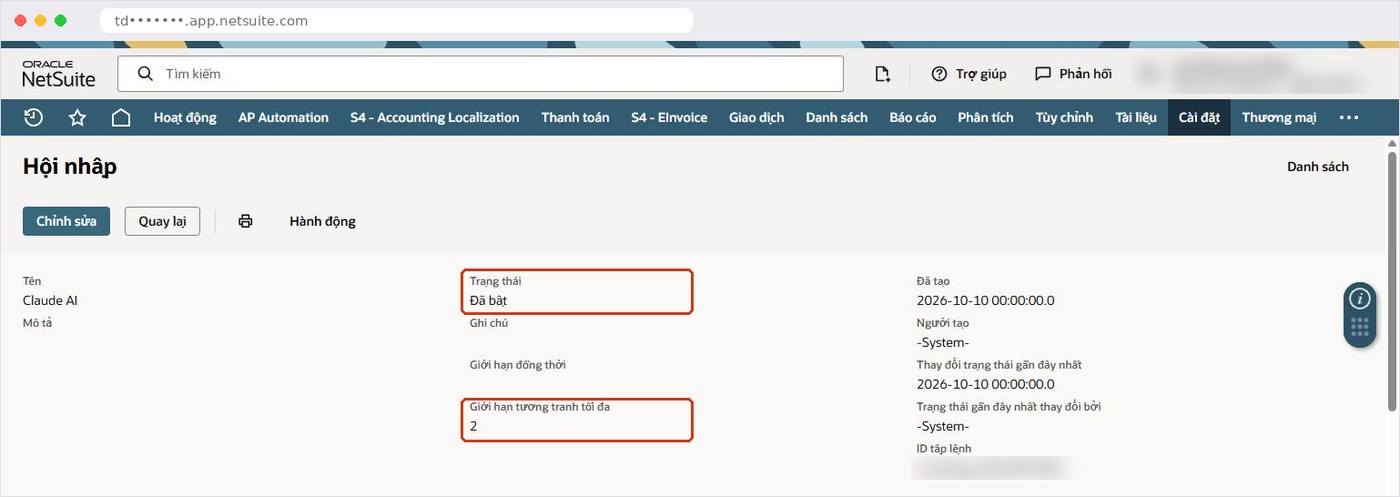
- An Integration Record. Use the Authorization Code Grant flow and the NetSuite AI Connector Service scope, and keep the Client ID and Client Secret for step 3.
- Copilot Studio capacity. Agent usage consumes Copilot Credits, which are managed by your company’s Microsoft 365/Office 365 administrator, so involve IT before a wide rollout.
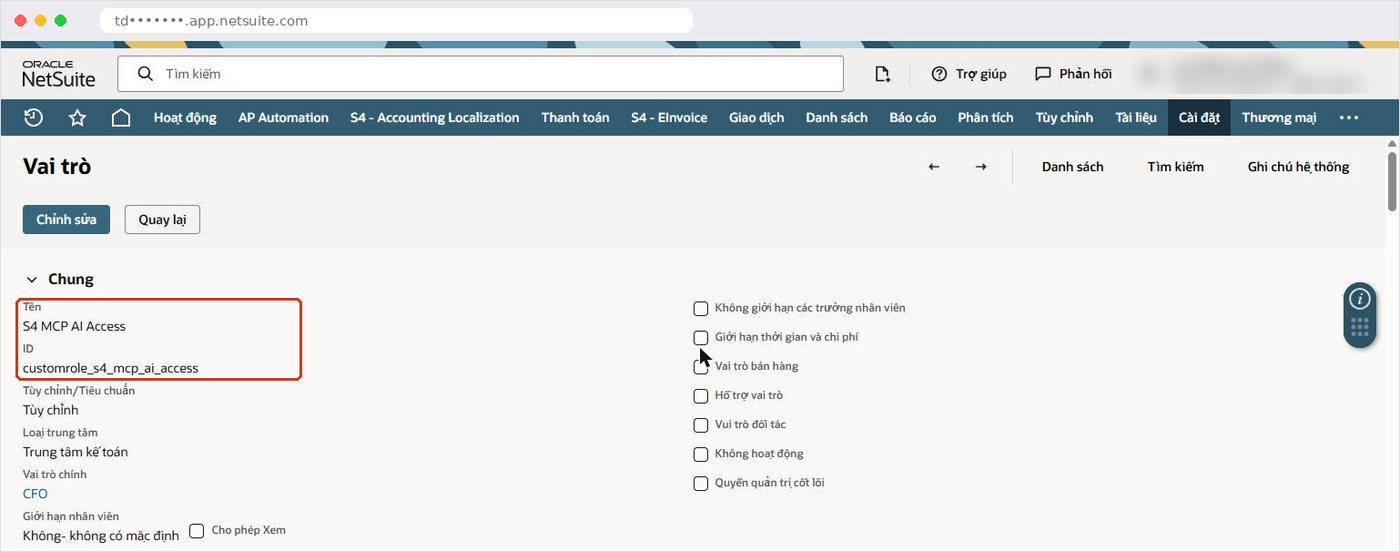
We recommend keeping the role’s permissions to what the agent’s job actually requires. An accounts payable assistant needs vendors, vendor bills and the payables aging report; if the first phase is about analysis, view-level access to that data is enough, and permission to create vendors can be added once a confirmation process is agreed. Note that “Log in using OAuth 2.0 Access Tokens” is a different permission from “Log in using Access Tokens” used by token-based authentication.
What are the 6 steps to build the agent?
The six steps are: create the agent and its instructions, add the MCP tool, configure OAuth manually, register the callback URL in Oracle NetSuite, create the connection and test, then publish to Teams.
Step 1: Create the agent and write its instructions
In Copilot Studio, go to Agents and create a new agent with a clear name; in the video it is called “Công nợ 331”, after the Vietnamese payables account. The instructions should state the agent’s purpose, require it to use only real data from Oracle NetSuite and to say so when nothing is found, and describe the output format, for example an aging table by overdue buckets. Specific instructions produce more consistent answers.
Step 2: Add a Model Context Protocol tool
Under Tools, choose Add a tool, New tool, then Model Context Protocol. Enter a name, a description of what the server is for, and the server URL in the form https://<account ID>.suitetalk.api.netsuite.com/services/mcp/v1/suiteapp/com.netsuite.mcpstandardtools. If you also want custom tools, use the URL ending in /services/mcp/v1/all. Select OAuth 2.0 as the authentication type.
Step 3: Configure OAuth 2.0 manually
Choose the Manual option, fill in the fields below and select Create.
| Copilot Studio field | Value |
|---|---|
| Client ID | From the Integration Record |
| Client Secret | From the Integration Record, shown only once when saved |
| Authorization URL | https://<account ID>.app.netsuite.com/app/login/oauth2/authorize.nl |
| Token URL | https://<account ID>.suitetalk.api.netsuite.com/services/rest/auth/oauth2/v1/token |
| Refresh URL | Same as the Token URL |
| Scope | mcp |
Step 4: Register the callback URL in Oracle NetSuite
Copilot Studio then generates a callback (redirect) URL. Copy it, open the Integration Record in Oracle NetSuite, paste it into the Redirect URI field, confirm the NetSuite AI Connector Service scope is selected and save.
Step 5: Create the connection and test it
Create the connection and the Oracle NetSuite sign-in window opens. If you are in the Administrator role, the system refuses it; switch to the dedicated role, review the permissions being granted and select Continue. The Oracle NetSuite server then appears under the agent’s Tools. In the Test pane of the video we ask, in Vietnamese, whether the sample company Sao Mai has any payables outstanding, and the agent answers in Vietnamese with the total still owed, the number of vendors and the ten vendors with the largest balances. The agent can also create or update data, for example a new vendor, and it proposes the details for the user to confirm before writing to Oracle NetSuite.
Step 6: Publish to Microsoft 365 and Teams
Once testing is satisfactory, publish the agent to the Microsoft 365 and Teams channel, as we did earlier with an accounts receivable assistant. The agent can be shared across the organization, and users work with it directly in Teams chat or Copilot.
How is usage billed?
On the Microsoft side, agent usage is billed in Copilot Credits, and capacity is managed by your Microsoft 365/Office 365 administrator. Microsoft Learn explains that different agent activities consume different amounts of credits and that the Monitor page shows monthly credit consumption; older licenses count billed sessions instead. We do not quote prices because they depend on each company’s Microsoft agreement. A sensible approach is to confirm available capacity with IT, publish to a small group first and watch consumption before expanding.
How do you keep control of the data?
The Oracle NetSuite role is the decisive control: the agent can do only what the role allows, so the company keeps control of the data scope. Other layers sit around it.
- Dedicated role: limits what the agent can query, create or update; Administrator is blocked.
- Integration Record: lets you switch the connection off and set a concurrency limit that is shared with other integrations.
- DLP policy: blocking the Power Platform connector also blocks the MCP server and its tools.
- Confirmation before writing: users approve details before records are created or changed.
- Execution Log: the AI Connector Service (MCP) tab keeps each call for 21 days in production and 7 days in sandbox.
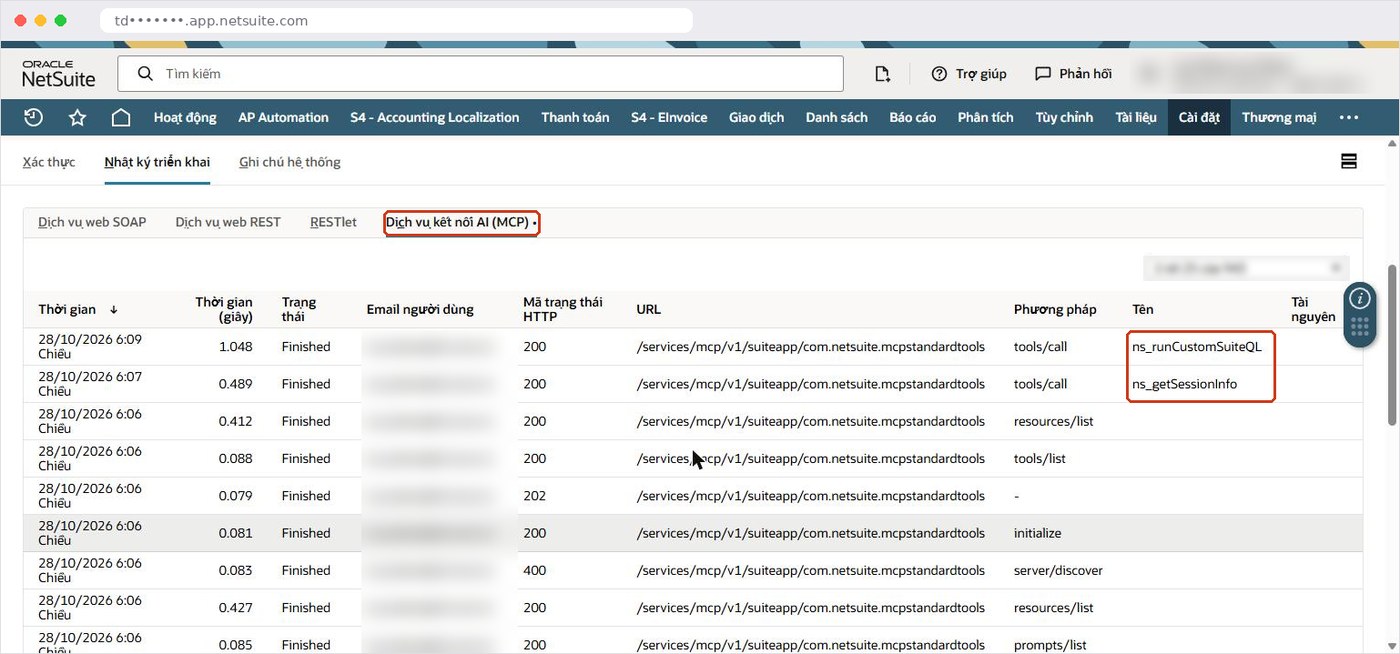
Oracle is clear that Oracle NetSuite cannot eliminate prompt injection or hallucination, only limit their impact. It recommends preferring standard reports and saved searches over SuiteQL, not using SuiteQL for official financial reporting, and always verifying results. Treat the agent’s answers as a fast lookup and take official figures from standard reports.
Copilot Studio or Claude and ChatGPT?
It depends on where your people work and how you want to govern access. Claude and ChatGPT offer a built-in connection flow and create the Integration Record automatically, which makes individual setup quick. Copilot Studio requires you to create the Integration Record and configure OAuth yourself, but in return the agent lives in Microsoft 365, can be shared with many users and is administered centrally. All of them go through the same NetSuite AI Connector Service and the same role-based permissions. For the other route, see our guide to connecting Claude and ChatGPT to Oracle NetSuite securely.
Which errors come up most often?
Most issues sit at the join between the two systems:
- Redirect error at sign-in: the callback URL has not been pasted into the Redirect URI field.
- Consent fails: the NetSuite AI Connector Service scope is missing, or the Scope field is not mcp.
- Role rejected: you are signing in as Administrator or another full-access role.
- Empty tool list: the SuiteApp is not fully installed or the role lacks permissions.
- Server unavailable despite correct setup: a DLP policy blocks the connector.
- Too Many Requests: the Integration Record’s concurrency limit, shared with other integrations, has been exceeded.
How can S4 Consulting help?
S4 Consulting is an Oracle NetSuite consulting firm in Vietnam and an Acumatica Gold Partner in Vietnam. We help design agent roles by function, configure the NetSuite AI Connector Service, write agent instructions that reflect Vietnamese accounting practice, and set up log reviews. Our usual approach is to start with one narrow assistant, review results with the chief accountant, then extend. For local statutory requirements, see our Oracle NetSuite financial localization for Vietnam; to discuss your case, contact our team or register for the free webinar on 6 November 2026.
Using ChatGPT and Claude with Oracle NetSuite: practical tips to lighten the accounting workload
3:00-4:00 PM (Vietnam time), Friday 6 November 2026 on Microsoft Teams. Free, registration required to receive the joining link.
Frequently asked questions
How does a Copilot Studio agent connect to Oracle NetSuite?
It adds the NetSuite AI Connector Service as an MCP tool and authenticates with manually configured OAuth 2.0 against an Integration Record. Every call runs under the permissions of the role chosen at sign-in.
Can the agent create or update Oracle NetSuite records?
Yes. The agent can query, create or update data depending on the permissions of the selected role, and it asks the user to confirm details before writing.
Can I connect using the Administrator role?
No. Oracle NetSuite blocks Administrator and other full-access roles at sign-in, so create a dedicated role for the agent.
How is a Copilot Studio agent billed?
Usage consumes Copilot Credits, managed by your Microsoft 365 administrator and tracked on the Monitor page. Pricing depends on your Microsoft agreement.
Is the video available in English?
The video is narrated in Vietnamese. This article covers the same six steps in English.
References
- Microsoft Learn - Connect your agent to an existing Model Context Protocol (MCP) server
- Microsoft Learn - View agent’s billing consumption (Copilot Credits)
- Microsoft Learn - Connect and configure an agent for Teams and Microsoft 365 Copilot
- Oracle NetSuite Help - Required Features and Permissions (NetSuite AI Connector Service)
- Oracle NetSuite Help - Associated Risks, Controls, and Mitigation Strategies