


S4 eSuite FAM for NetSuite · Scope
Which transactions does S4 eSuite FAM cover on Oracle NetSuite?
S4 eSuite FAM for NetSuite covers the full lifecycle of fixed assets and tools under Vietnamese accounting, from proposals, additions and depreciation through changes in use and transfers to sales, write-offs and physical counts. This page lists the transactions on the module menu, the functions that NetSuite’s standard Fixed Assets Management module does not provide, such as QR asset labels, phone-based counts and VAS registers, and what the module does not cover yet.
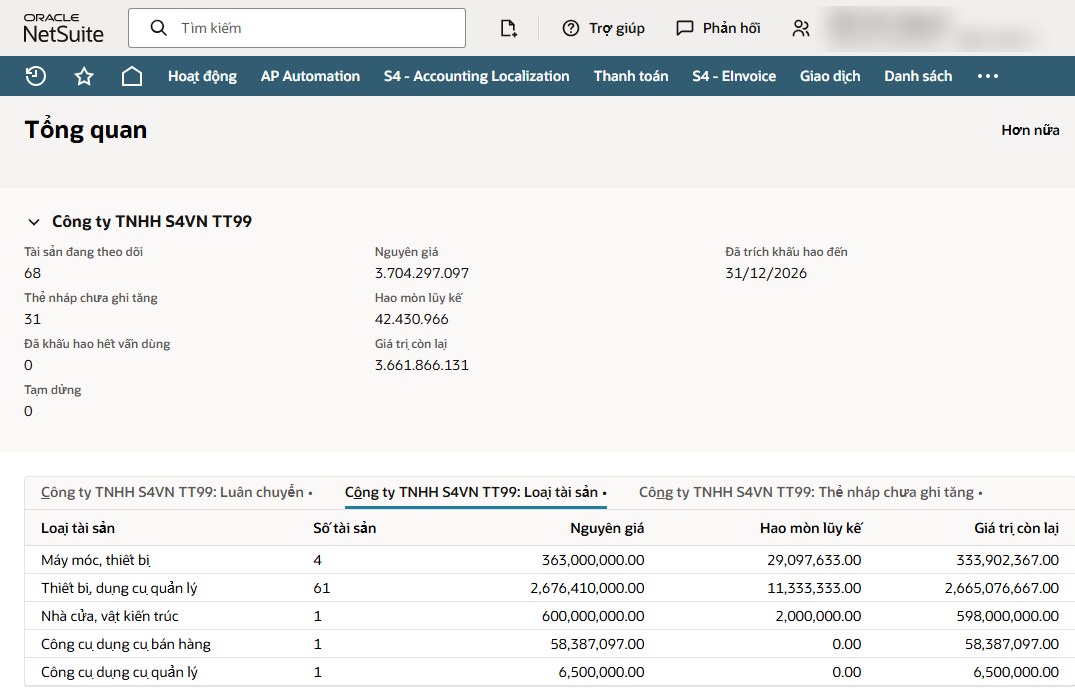
Screenshot of S4 eSuite FAM on Oracle NetSuite.
Video
See the module’s transactions on Oracle NetSuite.
Introduction to S4 eSuite FAM for Oracle NetSuite: Circular 45 asset groups and day-based depreciation, depreciation preview with the tax-deductible portion, QR labels and phone-based counts, Circular 99 registers and the B09 note with drill-down, book-tax differences and asset-to-GL reconciliation.
How it is organized
How is the module organized in NetSuite?
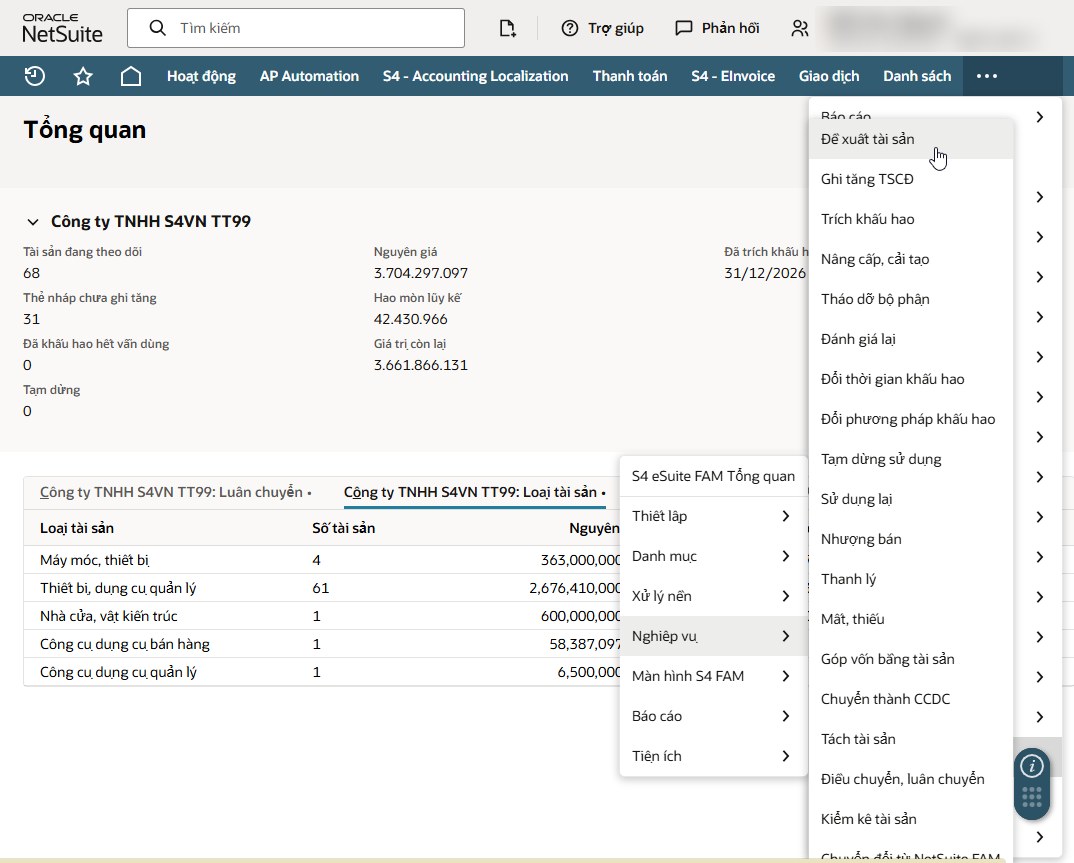
S4 eSuite FAM is its own menu group in Oracle NetSuite and shares the general ledger, subsidiaries, departments, locations and projects with other modules. Accountants start from the overview by subsidiary and work through eight function groups; the Transactions group holds every voucher that changes an asset.
Screenshot of S4 eSuite FAM on Oracle NetSuite.
Transaction list
What is on the Transactions menu?
The transactions below follow the menu items one to one (the interface in the screenshot is in Vietnamese). Each is a numbered voucher with a posting date and description, posts journals in account pairs and prints the statutory form where one applies.
Additions
Create draft cards from item receipts or account 2411 lines, pooling purchase price, freight, installation and commissioning into one asset.
Match the vendor bill to the card and transfer Dr 211 / Cr 2411 in one journal. The source of each addition (purchase, completed construction 2412, capital contribution, donation) is captured for the B09 note; handover form 01-TSCĐ.
For companies already on NetSuite’s standard Fixed Assets Management module, moving assets currently managed there into S4 eSuite FAM.
Depreciation
Preview before posting: days counted under Circular 45, charge, tax-deductible portion and allocation by expense account. Catch-up and reversal; table 06-TSCĐ.
Checked against Appendix I ranges; the asset card counts how many changes were made.
Between straight line, adjusted declining balance (coefficients 1.5, 2.0, 2.5) and units of production; the card counts changes.
Changes in use
Costs through 2413 increase the asset cost and recalculate the charge, with form 03-TSCĐ.
Record a component removed from the asset and adjust its value accordingly.
By decision and valuation committee, with form 04-TSCĐ.
Stop depreciation when an asset is idle or under long repair, tracking the suspension period.
Bring a suspended asset back into depreciation from the date it is used again.
Split one card into several assets by quantity.
Move a fixed asset that no longer qualifies into tools, amortized through 242.
Slips with requester, approver, sender and receiver, a step log, handover minutes and condition at hand-off and receipt; change department, location, project or segment. Assign to employees, lend and return.
Disposals
Sale voucher and form 02-TSCĐ; one account per side: Dr 214, Dr 811 / Cr 211 and Dr 131 / Cr 711, Cr 3331, keeping project and department dimensions.
Disposal committee, form 02-TSCĐ, paired journals.
Written off pending resolution in 1381.
Assets contributed to another entity, with the valuation difference to 711 or 811.
Physical count
Open a count, scan with a phone or scanner. Closing the count creates the entries: shortages to 1381, surpluses as draft cards against 3381, damaged assets paused; print form 05-TSCĐ.
Beyond NetSuite’s standard Fixed Assets Management module
Which functions does NetSuite’s standard Fixed Assets Management module not provide?
According to the S4 development team review, the functions below are not available in NetSuite’s standard Fixed Assets Management module. Companies on NetSuite’s standard Fixed Assets Management module usually customize or keep parallel spreadsheets, especially for labels, physical counts and Vietnamese registers.
Labels
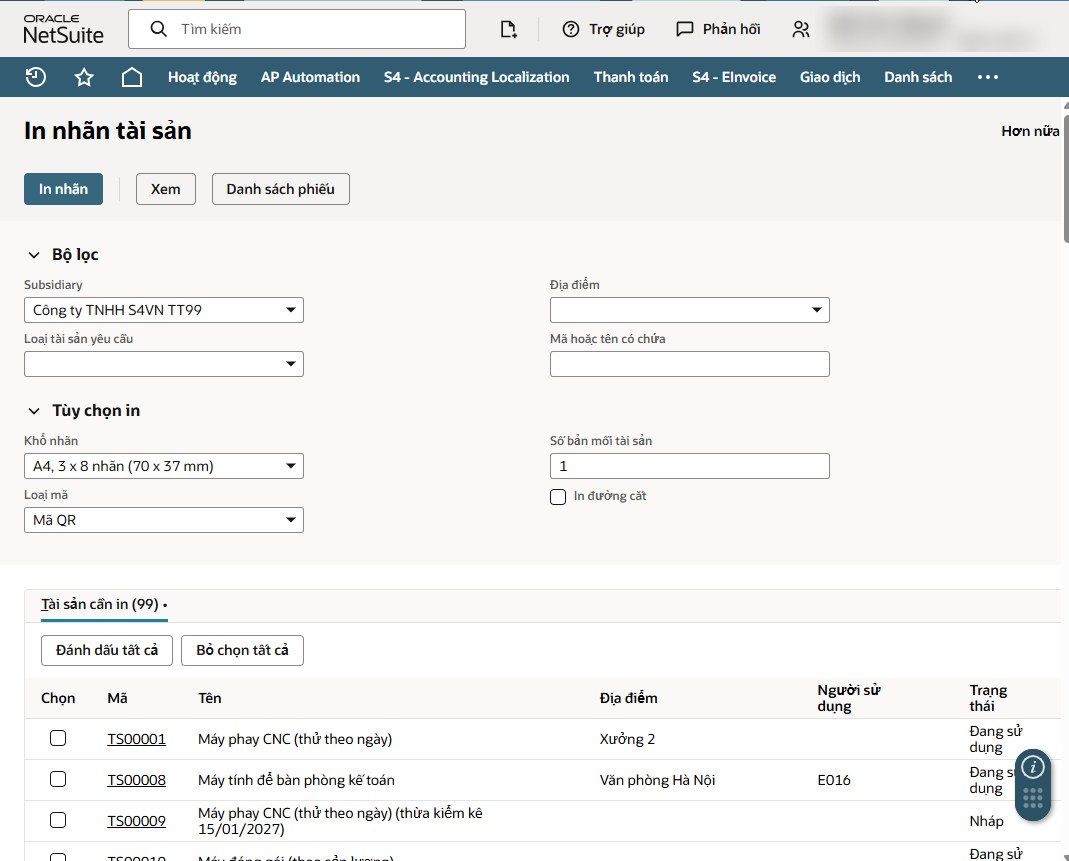
QR and barcode labels for every asset
The Print asset labels screen filters by subsidiary, location, asset type or code and name, then prints labels in bulk to stick on the assets.
- A4 sheet, 3 x 8 labels (70 x 37 mm)
- QR code or barcode
- Copies per asset, optional cut lines
- Select single assets or the whole list
Screenshot of S4 eSuite FAM on Oracle NetSuite.
Physical count
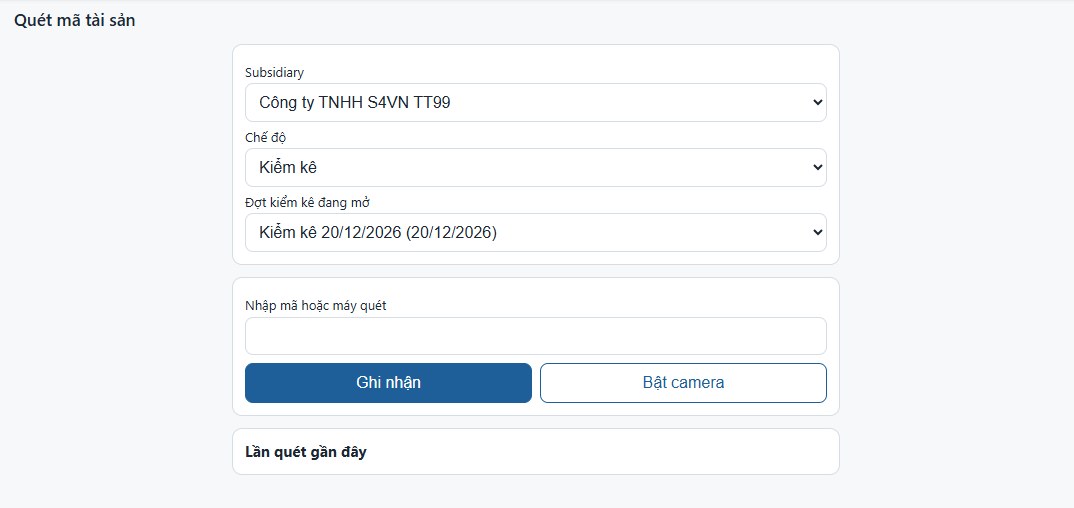
Counts with a phone or scanner
The Scan asset code page runs in a phone browser. In Count mode, staff pick the open count, switch on the camera or use a scanner, and every scan is recorded against the count immediately.
- Lookup, count and receive-by-transfer modes
- Closing a count creates shortage, surplus and damage entries
- Surpluses as draft cards against 3381, shortages to 1381
- Count minutes form 05-TSCĐ
Screenshot of S4 eSuite FAM on Oracle NetSuite.
VAS registers
Registers and reports in Circular 99 formats
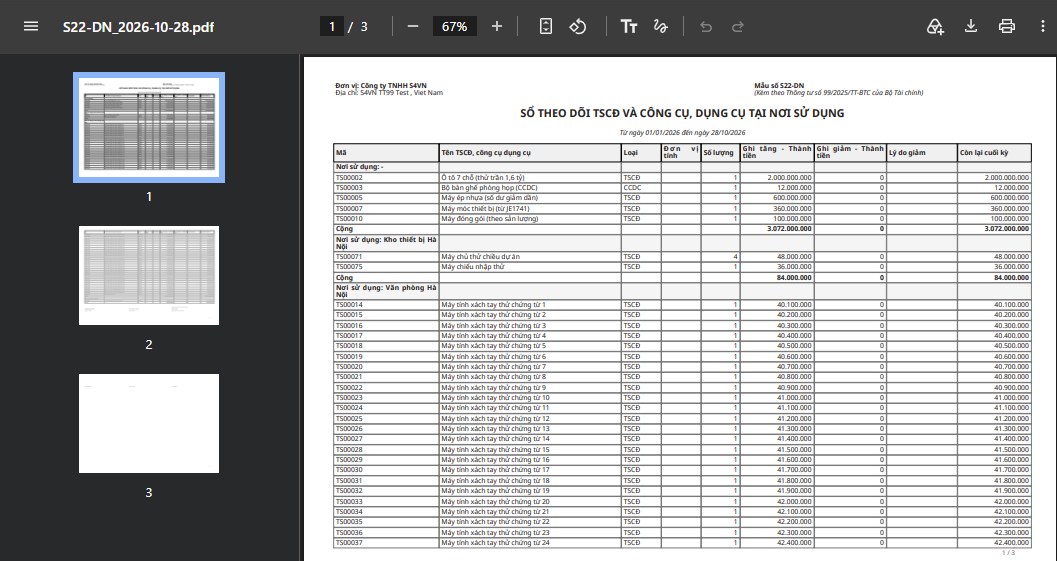
NetSuite’s standard Fixed Assets Management module reports are the Asset Register and Asset Summary. S4 eSuite FAM produces the Circular 99 registers on screen and exports to PDF, Excel and CSV. Below is register S22-DN by place of use, exported to PDF.
- S21-DN fixed asset register
- S22-DN fixed assets and tools by place of use
- S23-DN fixed asset card
- Forms 01 to 06-TSCĐ, depreciation and allocation table 06-TSCĐ
- B09-DN note V.09 to V.11, click a number for detail
Screenshot of S4 eSuite FAM on Oracle NetSuite.
Physical management
Insurance, warranty and inspection reminders
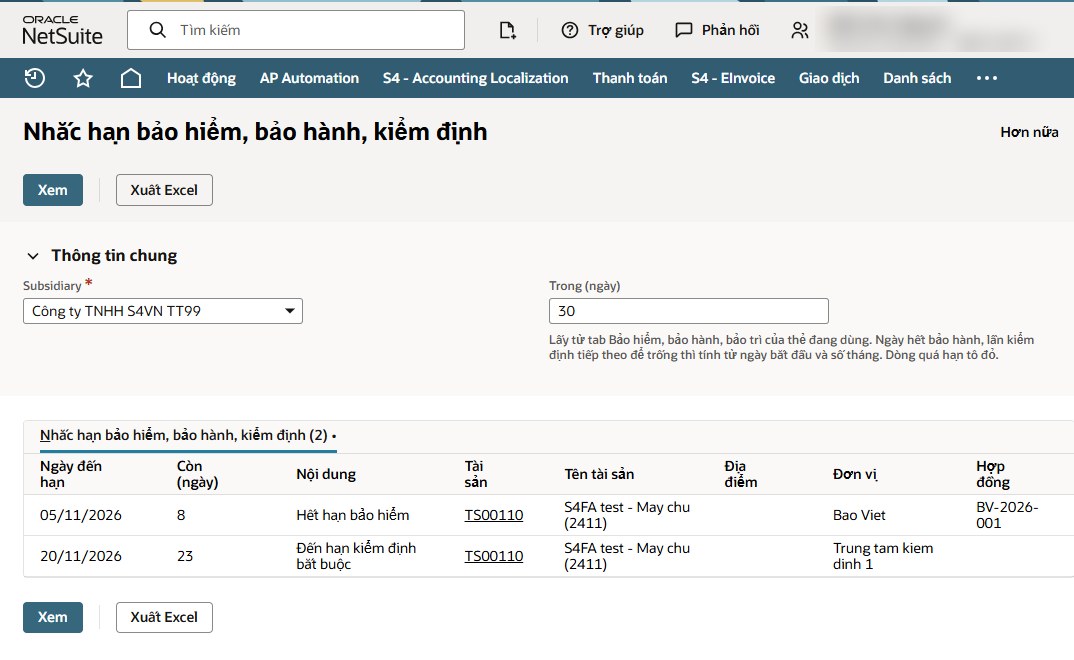
Insurance, warranty and maintenance details on the asset card roll up into a list of items due within the chosen number of days, overdue lines in red, with Excel export to assign the work.
- Due date and days remaining
- Contract and provider
- Next inspection calculated from start date and cycle
Screenshot of S4 eSuite FAM on Oracle NetSuite.
Other differences from NetSuite’s standard Fixed Assets Management module
| Function | NetSuite’s standard Fixed Assets Management module | S4 eSuite FAM |
|---|---|---|
| Depreciation by actual days in use, adjusted coefficients, Circular 45 Appendix I ranges | Not available | Yes |
| Tools and account 242 prepaid amortization | Not available | Yes |
| Overview by subsidiary: assets tracked, draft cards, cost, accumulated depreciation, net book value | Not available | Yes |
| Pooling 2411 costs, matching vendor bills to asset cards | Not available | Yes |
| Reconciling the asset ledger to GL accounts 211x, 214x, 242 | Not available | Yes |
| Daily depreciation schedule; asset cards and opening balances from Vietnamese-format Excel with Circular 45 checks | Not available | Yes |
| Journals in account pairs (811/711, 1381, capital contribution) | Partial | Yes |
| Vietnamese CIT tax book and book-tax depreciation differences | Partial | Yes |
Source: internal comparison by the S4 eSuite FAM development team, October 2026.
Outside current scope
What does the module not cover yet?
S4 eSuite FAM focuses on Vietnamese Accounting Standards. In the current version the following are not in the module, and NetSuite’s standard Fixed Assets Management module handles them better:
- Invoicing directly from the sale voucher. The sales invoice for an asset is created with NetSuite sales functions.
- Changing the asset type on a transfer. S4 transfer slips change department, location, project and segment, not asset type.
- Parallel IFRS books and transfers between subsidiaries.
- IFRS 16 leases, which are outside VAS scope.
Companies with these needs should talk to S4 about the right setup, which can combine the module with NetSuite’s standard Fixed Assets Management module.
FAQ
About the scope of S4 eSuite FAM
Want to see a specific transaction run? Book a demo with an S4 consultant.
S4 eSuite FAM for NetSuite
See these transactions run on NetSuite with your own data.
S4 Consulting is an Oracle NetSuite consulting firm in Vietnam. In a demo, S4 consultants run additions, depreciation, transfers, a QR count and the Circular 99 registers directly in NetSuite.

Need a trusted ERP partner in Vietnam? Let’s discuss your project!