


S4 WMS · Oracle NetSuite
A WMS app integrated with Oracle NetSuite, scan and record transactions right on the warehouse and shop floor.
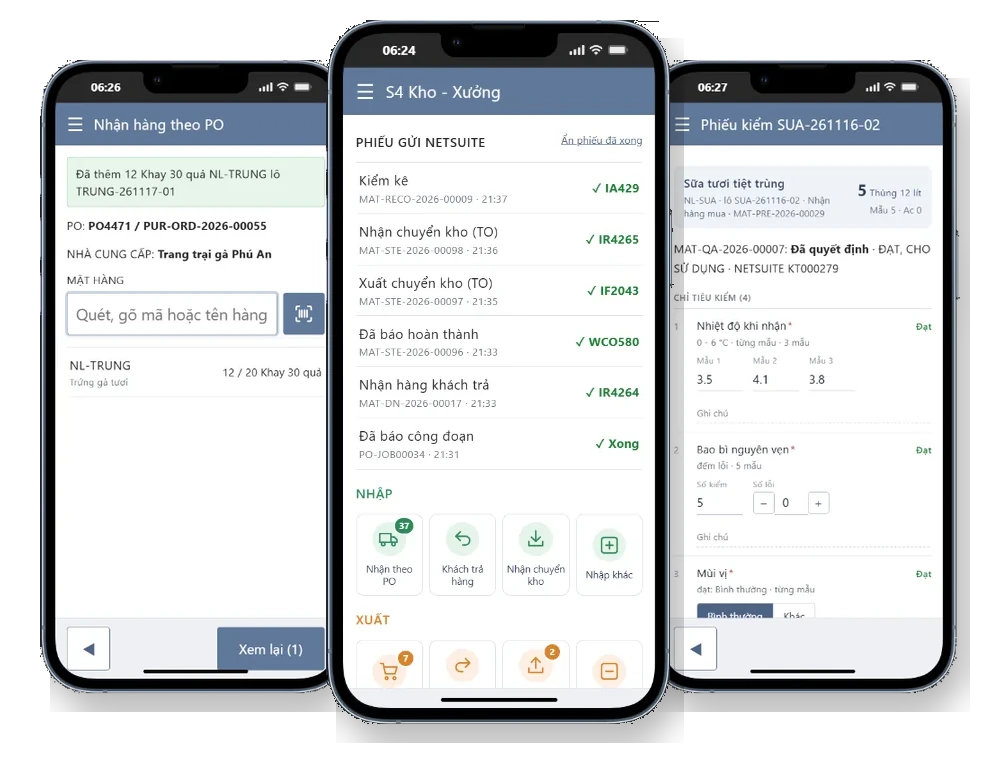
S4 WMS is a barcode and QR code scanning app developed by S4 for companies running Oracle NetSuite. Warehouse keepers, production teams and QC staff use handheld scanners or phones to receive, ship, transfer, count stock, issue materials, report operations and inspect quality. Each transaction is sent to NetSuite for posting; once posted, the NetSuite transaction number appears in the app.
Why S4 WMS
What does a NetSuite WMS app change for the warehouse and shop floor?
Most inventory discrepancies start with record keeping: notes taken by hand in the warehouse, keyed in later. S4 WMS moves recording to where the work happens, using the same items, locations, lots and transactions as NetSuite.
Scale users across the warehouse and shop floor
S4 WMS lets every warehouse and shop floor worker operate without buying additional NetSuite user licenses. Each person has their own S4 WMS account, limited by location and role, and transactions are still recorded in full in NetSuite.
The right item, lot and expiry date
Scanning replaces typing. The app blocks receiving beyond the open quantity, blocks issuing expired lots or lots that failed inspection, and lists the lots with the nearest expiry first when shipping.
Data captured on the line
Warehouse and production teams record each step as they do it, instead of writing it on paper and keying it in later. When NetSuite finishes posting, the app beeps and shows the transaction number.
Walkthrough video
How does S4 WMS work on a phone?
An 8-minute walkthrough of S4 WMS on a phone: scan or pick purchase orders, sales orders, work orders and transfer orders; scan items and lots, enter quantities and follow the transactions recorded in Oracle NetSuite. Narrated in Vietnamese.
Features
What can S4 WMS do?
Receiving
Receive against purchase orders (PO), customer returns, transfer receipts and other receipts. New lots get a suggested lot number and expiry date based on item setup.
Shipping and issues
Ship against sales orders (SO), return to vendors against the original receipt, ship transfers and other issues. Earliest-expiring lots are listed first.
Transfers and counts
Move stock between locations, fulfill NetSuite transfer orders (one step or through in-transit) and run blind counts by lot.
Production
Issue materials to work orders by bill of materials, report operations with time spent, and report completions with finished-goods lot, expiry and scrap.
On-the-spot inspection
Take an inspection, record each sample, count defects, add photos. The QC lead makes the usage decision; failed lots are blocked from issue.
Stock and history
Look up stock by item or lot across locations, with expiry and committed quantities. Review completed transactions and their NetSuite numbers.
Receiving
Receive against a PO, create lots and expiry dates as goods arrive
The warehouse keeper taps a purchase order in the pending list or scans the PO number. Each line shows scanned versus required quantity. For lot-tracked items, the app suggests a new lot number and expiry date; the keeper can also scan the supplier lot printed on the packaging.
- No receiving beyond the open PO quantity.
- Partial receipts are allowed; the rest is received later.
- NetSuite records an Item Receipt from the purchase order, with lots in Inventory Detail.
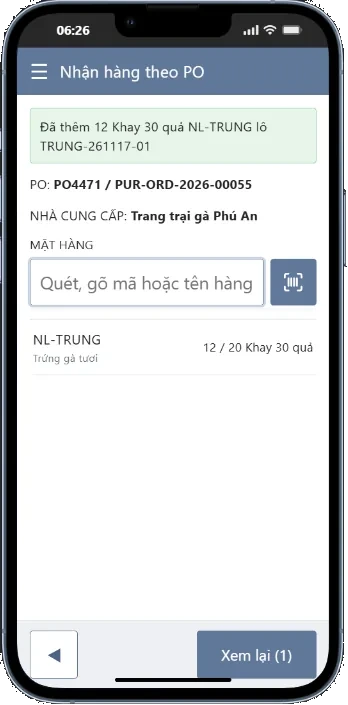
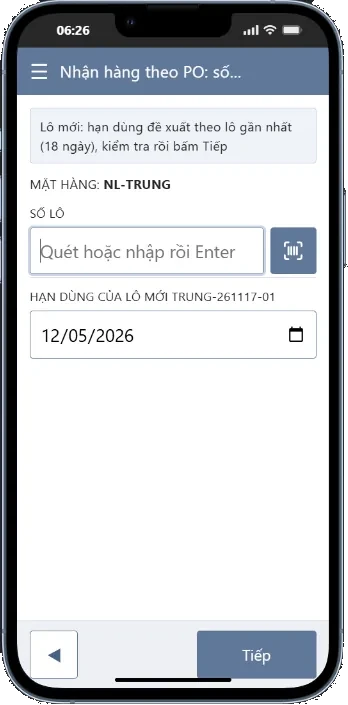
Receiving against a PO and creating a new lot.
Shipping
Ship against an SO, earliest expiry first
When shipping, lots in the location are sorted by expiry date with available quantity per lot. Expired lots are greyed out and cannot be selected. Lots awaiting inspection carry their own label and require confirmation before use.
- Available quantity excludes stock pending in NetSuite and stock already scanned on the current document.
- One line can ship from several lots.
- NetSuite records an Item Fulfillment from the sales order.
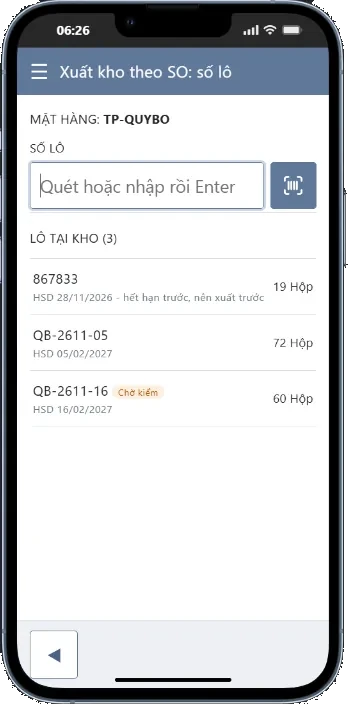
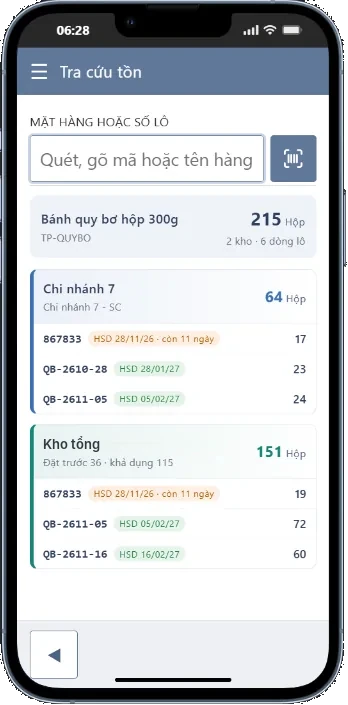
Choosing lots when shipping and looking up stock by expiry.
Quality inspection
QC staff record results on the spot, the QC lead decides on the phone
Open inspections are sorted by priority and due date. QC staff enter each sample, count defects, mark pass or fail and take photos; every characteristic is scored against its limits right away. The QC lead chooses accept, concession, partial or reject, and how to handle the rejected quantity: hold, return to vendor, scrap or rework.
- Works with S4 Advanced Quality Management on NetSuite: inspections come from NetSuite, results and decisions go back to NetSuite.
- Rejected lots are blocked from shipping, material issue and transfers.
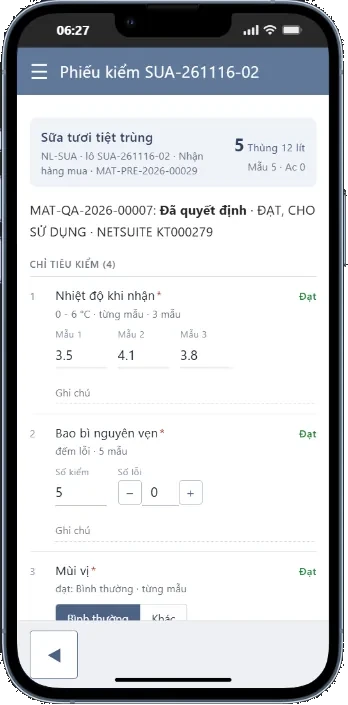
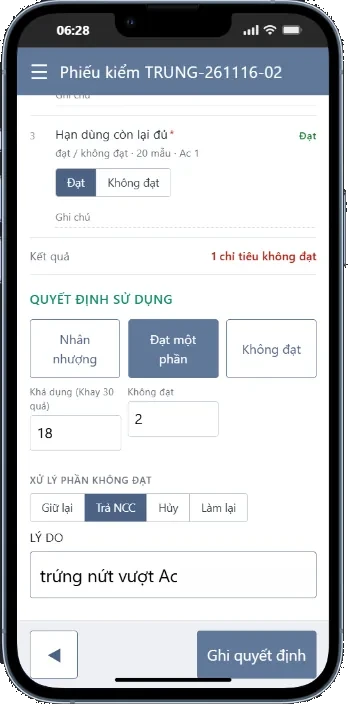
Inspection and usage decision.
Tracking
Every document has a status and a NetSuite number
The home screen lists documents just sent to NetSuite and the pending workload on each tile. When NetSuite finishes posting, the app plays two high beeps and shows the transaction number; on an error it plays two low beeps and shows a red line the user can tap for details. The history screen searches by PO, SO, transfer order, work order or NetSuite number.
- Resending never creates duplicates.
- Each account only sees the locations and documents it is permitted to.
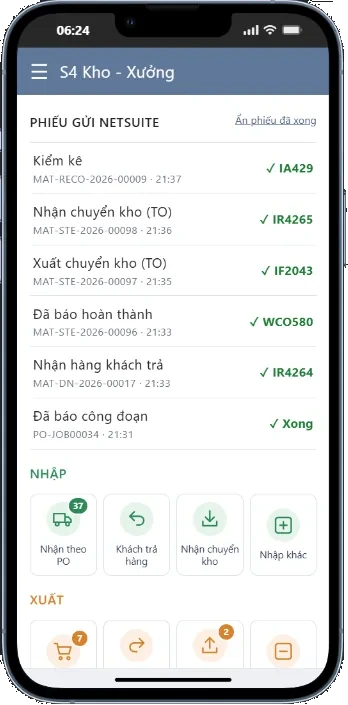
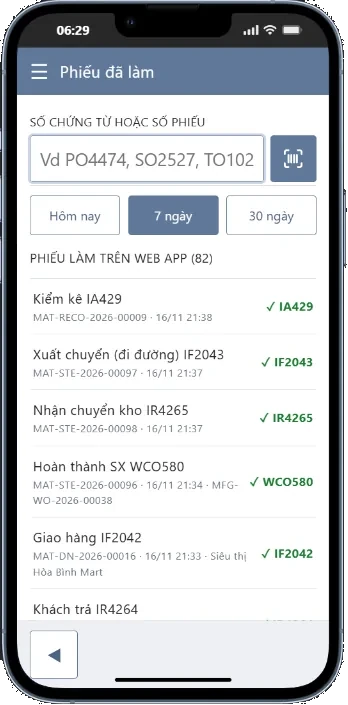
Home screen and history.
Integration control
Administrators monitor and control each integration flow
An admin screen shows the NetSuite connection status, the queue and failed messages. Administrators switch each flow on, off or to manual approval, and retry or skip failed messages without technical intervention.
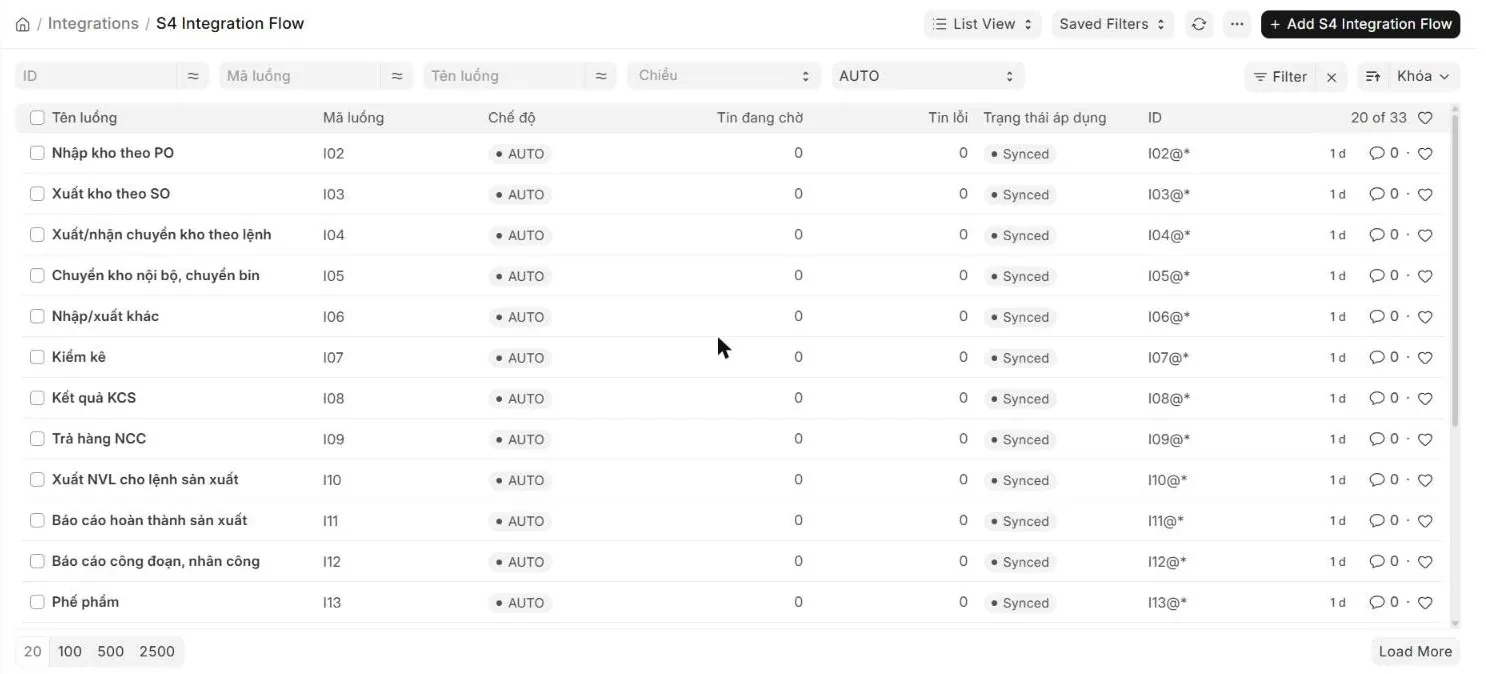
Integration flows with mode, pending and failed messages.
Controls
How does S4 WMS prevent warehouse errors?
No receiving, shipping or returning beyond the open quantity on the PO, SO or original document. Items not on the document are rejected.
Expired lots, lots without stock and lots of another item are rejected with a clear message. Earliest-expiring lots go out first.
Available stock excludes quantities pending in NetSuite and quantities held after inspection, so several people can work at once without double issuing.
Counters do not see book quantities; NetSuite adjusts the difference lot by lot.
Operations are reported in order, completions require materials to be issued, and good plus scrap cannot exceed the open quantity.
Accounts are limited by location and role: warehouse keeper, production team, QC staff, QC lead.
Fit and implementation
Which companies is S4 WMS for?
Manufacturing, food, consumer goods
Companies that track lots and expiry, run work orders in NetSuite and need to record materials, operations, finished goods and quality checks on the shop floor.
Distribution, multi-warehouse
Companies with several locations and daily receipts, shipments and transfers, whose warehouse teams need speed while stock stays in line with NetSuite.
With S4 Consulting
S4 Consulting, an Oracle NetSuite consultancy in Vietnam, configures locations, roles and integration flows and trains warehouse and shop floor teams on the company’s own devices.
FAQ
About the NetSuite WMS app
Can’t find your answer? Send your question to an S4 expert.
S4 WMS
Record warehouse and shop floor work where it happens.
S4 Consulting is an Oracle NetSuite consultancy in Vietnam. Contact S4 to see S4 WMS running with your locations, items and processes.

Need a trusted ERP partner in Vietnam? Let’s discuss your project!