



Payroll software inside ERP: S4 eSuite Payroll for construction, manufacturing, consultancies and F&B
Payroll software inside ERP is a payroll module that runs within the business management system itself, sharing employee, time, project and accounting data instead of living in a separate program. S4 eSuite Payroll is a Vietnamese payroll module built by S4 Consulting and running inside Acumatica Cloud ERP. It saves the payroll team time, reduces errors and puts labor cost on the right site, workshop, project or store as soon as payroll is approved.
Below we compare this with standalone payroll and summarize how it applies to four industries. All figures in the videos and examples are demo data with fictitious names.
Why is payroll slow and error-prone for companies with a large workforce?
Payroll takes time because every employee carries many variables: workdays, shift hours, allowances, bonuses, social insurance and personal income tax (PIT). The payroll team collects data from time clocks, crew spreadsheets and sales reports and cross-checks it before pay day, and every manual entry is a chance for error.
The second problem is management accounting. With standalone payroll, accountants merge payroll with timesheets at month end to allocate cost, so labor cost by site, workshop, project or store always arrives late, when it is too late to adjust staffing within the period.
How does payroll software inside ERP differ from a standalone payroll system?
The core difference is data. Payroll software inside ERP shares one platform with accounting, projects and manufacturing, so there is no separate payroll package to buy and no data shuttling. Hours, accepted quantities and store sales flow straight into payroll, and labor cost flows straight to the cost object.
| Criterion | Standalone payroll | Payroll in Acumatica with S4 eSuite Payroll |
|---|---|---|
| Inputs | File exports and imports from time, projects, sales | Shared data on one platform |
| Labor and employer insurance cost | Accountants merge and allocate at month end | To sites, workshops, projects, stores at payroll calculation and approval |
| When the law changes | Wait for an update or edit formulas | Add a new parameter row with an effective date |
| Rates, coefficients, bonuses | Often requires formula changes | Rules set once on the pay group |
| Project P&L | Missing actual payroll cost until close | Includes actual payroll cost |
Acumatica is an ERP for mid-sized and large companies and does not charge per user, so site managers, team leaders and store managers can enter quantities and approve attendance where the data originates.
What does S4 eSuite Payroll do on Acumatica?
S4 eSuite Payroll covers employee records, labor contracts, attendance, payroll, insurance, PIT, payslips and cost allocation. Shared capabilities:
- Statutory parameters with effective dates: when the law changes, add a row instead of rewriting a formula.
- Earnings as configured rules: set once on the pay group; changing a rate or coefficient needs no programming.
- Automatic insurance and tax: social, health and unemployment insurance and PIT, with tax-exempt income split out.
- Freelancers and service contracts: paid hourly or monthly, with 10% PIT withheld by threshold.
- Cost allocation at source: salaries, benefits and employer insurance reach the right cost object at payroll calculation and approval; project P&L includes actual payroll cost.
- Approval and reporting: approval with history, bilingual payslips by email, a payroll dashboard for management, multiple companies on one system.
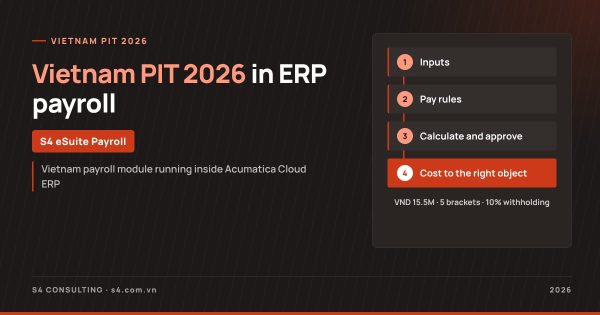
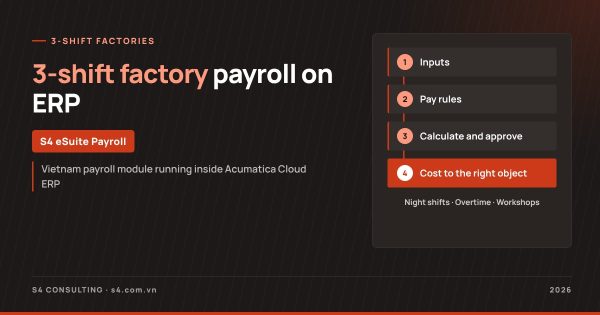
The flow below summarizes the four steps of the payroll process on Acumatica.
S4 eSuite Payroll module flow on Acumatica
1. Inputs
- Time, project hours, accepted quantities
- Labor contracts, freelancers
- Store sales from the POS
2. Pay rules
- Pay groups, earnings as configured rules
- Statutory parameters with effective dates
- Cost allocation rules
3. Calculate and approve
- Payroll, insurance, PIT
- 10% withholding by threshold
- Payroll approval with history
4. Outputs
- Bilingual payslips
- Cost to sites, workshops, projects, stores
- Payroll dashboard, multiple companies
Scope and implementation details are on the S4 eSuite Payroll product page.
See the payroll module run on your data
S4 demonstrates payroll, social insurance, PIT and labor cost allocation on Acumatica using your own structure of sites, workshops, projects or stores.
How do construction companies run site payroll in ERP?
For general contractors, S4 eSuite Payroll runs inside Acumatica Construction. The video above simulates a contractor running 4 sites in the October pay period. The site manager enters accepted quantities and the system splits the crew’s pay by workdays and coefficients, as described in crew piece-rate pay by accepted quantities. Engineers’ and supervisors’ hours are logged by project and task.
At month end, the whole site payroll runs in a single click, and labor cost including employer insurance is allocated to each work item by hours. Crews are paid weekly and freelancers have 10% tax withheld. See S4 eSuite Payroll for Acumatica Construction on erpxaydung.com.
How do 3-shift factories, design consultancies and F&B chains use the module?
The same module applies a different set of rules per industry. S4 has three demo videos of about 3 minutes for the other models.
3-shift factories
The 3-shift factory payroll demo uses a sample plastics plant. A 3-shift, 4-crew rotation generates a month of rosters, swipes are loaded from the time clocks, and a night shift across midnight is still one shift. Night overtime is paid at 2.0 with the tax-exempt premium split out, and cost lands on each workshop. See 3-shift factory payroll on ERP.
Design consultancies
For a consultancy, salaries are the cost of sales. In the design consultancy demo (Vietnamese narration), architects log hours by project and design phase; cost follows hours where they exist, a versioned rate table where they do not, and a default project last. See ERP for design consultancies.
F&B chains
The F&B chain demo (Vietnamese narration) simulates S4 Bistro, a 30-store chain with three pay types: monthly office salaries, store staff with sales bonuses, and hourly part-timers. Sales sync from the POS, the store manager’s 1% bonus flows into payroll, and cost lands on each store. See payroll for F&B chains.
How does payroll keep up when tax law and minimum wages change?
When the law changes, the accountant adds a parameter row with an effective date; no formula is rewritten. In 2026, Personal Income Tax Law 109/2025/QH15 raises the personal deduction from VND 11 million to VND 15.5 million per month and cuts the tax table from 7 to 5 brackets; Decree 293/2025/ND-CP raises the region I monthly minimum wage to VND 5,310,000 from 1 January 2026; Decree 253/2026/ND-CP applies 10% withholding to payments from VND 5 million per time.
Old and new values coexist, and each pay period uses the value in force for that period. The full parameter table is in Vietnam personal income tax 2026 in ERP payroll.
What should a company prepare before moving payroll into ERP?
Standardize cost objects and earning rules before configuration:
- Cost objects: sites and work items, workshops, projects and phases, stores.
- Earning rules: current allowances, bonuses, piece rates and coefficients.
- Input sources: time clocks, POS, acceptance sheets and who owns each.
- Approval: who approves attendance and payroll, and when time is locked.
- Parallel run: one period alongside the current process.
Every dong of labor cost lands on the right site, workshop, project or store, on one platform. S4 eSuite Payroll is built by S4 Consulting, Acumatica Gold Partner in Vietnam. Contact S4 for a demo on your own data: ERP@s4.com.vn, phone/Zalo (+84) 93 2724 396.
Frequently asked questions
What is payroll software inside ERP?
It is a payroll module that runs inside the ERP and shares employee, time, project and accounting data, so labor cost reaches the right cost object as soon as payroll is approved.
Which platform does S4 eSuite Payroll run on?
S4 eSuite Payroll is a Vietnamese payroll module built by S4 Consulting that runs inside Acumatica Cloud ERP, on the same platform as accounting, projects and manufacturing.
Do payroll formulas need rewriting when PIT rules change?
No. Statutory parameters carry effective dates, so a law change means a new row, and each pay period uses the value in force for that period.
Which industries have an S4 eSuite Payroll demo?
S4 has demo videos for construction, 3-shift manufacturing, design consultancies and F&B chains, all based on demo data.
Can site and store managers use the system?
Yes. Acumatica does not charge per user, so site managers, team leaders and store managers can enter data and approve in the system.
References
- YouTube S4 Consulting - Acumatica Construction Payroll for Vietnam - Demo
- YouTube S4 Consulting - Acumatica Manufacturing Payroll for Vietnam - Demo
- Acumatica Blog - 4 ways unlimited user licensing helps businesses
- Tap chi Cong Thuong - What is new in the 2025 Personal Income Tax Law (in Vietnamese)
- LuatVietnam - Decree 293/2025/ND-CP on regional minimum wages (in Vietnamese)
- LSVN - Withholding threshold for casual income raised to VND 5 million per payment (in Vietnamese)