

Connect ChatGPT to Oracle NetSuite: install the official app, pick a dedicated role and avoid 429 errors
Written by the S4 Consulting Oracle NetSuite team · Updated 31 Oct 2026
To connect ChatGPT to Oracle NetSuite, you use the NetSuite app for ChatGPT, which is developed by Oracle NetSuite itself and listed on openai.com. Setup has two parts: an Oracle NetSuite administrator prepares the account once (enabling features, installing the MCP Standard Tools SuiteApp, creating and assigning a dedicated AI role), and then each user installs the app in ChatGPT, signs in and selects that role. From then on, finance teams can ask questions and review their books in plain language, while ChatGPT queries, creates or updates data only as far as the selected role allows. This guide follows our video and also explains how to avoid the common 429 Too Many Requests error.
The video is under three minutes long and narrated in Vietnamese, but the screens are straightforward, so you can watch the video walkthrough alongside this article. The written guide separates administrator tasks from user tasks, walks through the month-end review shown in the video, and summarizes the controls that finance and IT should agree on before rolling the connection out more widely. If you prefer a live discussion, S4 is hosting a free webinar on 6 November 2026 on combining ChatGPT and Claude with Oracle NetSuite.
Which app do you use to connect ChatGPT to Oracle NetSuite?
You use the NetSuite app for ChatGPT, whose listed developer is Oracle NetSuite rather than a third-party vendor. According to the OpenAI page, the app runs on the NetSuite AI Connector Service, which supports the Model Context Protocol (MCP). Through it, ChatGPT can access and work with Oracle NetSuite data and functions, generate reports and help streamline processes, while keeping the role-based security model that Oracle NetSuite already enforces.
For IT managers this matters. Because the app is built by Oracle NetSuite and goes through the AI Connector Service, there is no custom integration to write and no static password or token to hand over to ChatGPT. Users sign in to Oracle NetSuite with OAuth 2.0, choose a role, and every request ChatGPT sends back runs within that role’s permissions. Oracle’s documentation states that the AI Connector Service is not a paid add-on and that the MCP Standard Tools SuiteApp is free.
While recording the video, the S4 team noticed a few small but useful points. The 429 error showed up most clearly on multi-step requests, such as looking up data and then creating a purchase order, and asking ChatGPT to run queries one at a time is the approach we used in the video to keep it working more steadily. Each time a role’s permissions changed, we disconnected and reconnected so the new permissions applied, and we remind users to read the role line on the consent screen before clicking Allow.
Does the connection work on the free ChatGPT plan?
In S4’s video, the connection works on the free ChatGPT plan. Paid ChatGPT plans offer higher usage limits and more capable models, which helps when users run longer analyses or work with the connection every day. However, OpenAI notes that availability depends on the app, your plan and your workspace settings, and that some connections require an administrator to set them up or approve them. So we would not promise that every free account will work; the reliable approach is to check in your own ChatGPT account, and for business workspaces to ask your workspace administrator.
Who does what: administrator or user?
The Oracle NetSuite administrator does the groundwork once for the whole company, and each user then connects from their own ChatGPT account. This split keeps IT in control of who can use AI and what data it can reach, without users waiting for someone to install the app for them.
| Area | Oracle NetSuite administrator | User (accounting, finance) |
|---|---|---|
| How often | Once, revisited when permissions change | Once per user |
| Main tasks | Enable features, install the SuiteApp, create and assign the role | Install the app in ChatGPT, sign in, select the role |
| Decides | What the AI role can query, create or edit | What to ask, and what ChatGPT should not do |
| Monitoring | AI Connector Service Execution Log | Check results before using them |
What does the Oracle NetSuite administrator need to prepare?
The administrator completes four steps: enable the SuiteCloud features, install the MCP Standard Tools SuiteApp, create a dedicated AI role, and assign that role to the right people.
- Go to Setup > Company > Enable Features, SuiteCloud subtab, turn on Server SuiteScript, OAuth 2.0 and REST Web Services, then save.
- Open SuiteApps, search for the MCP Standard Tools SuiteApp and install it. It provides the standard tools the AI uses to work with Oracle NetSuite data.
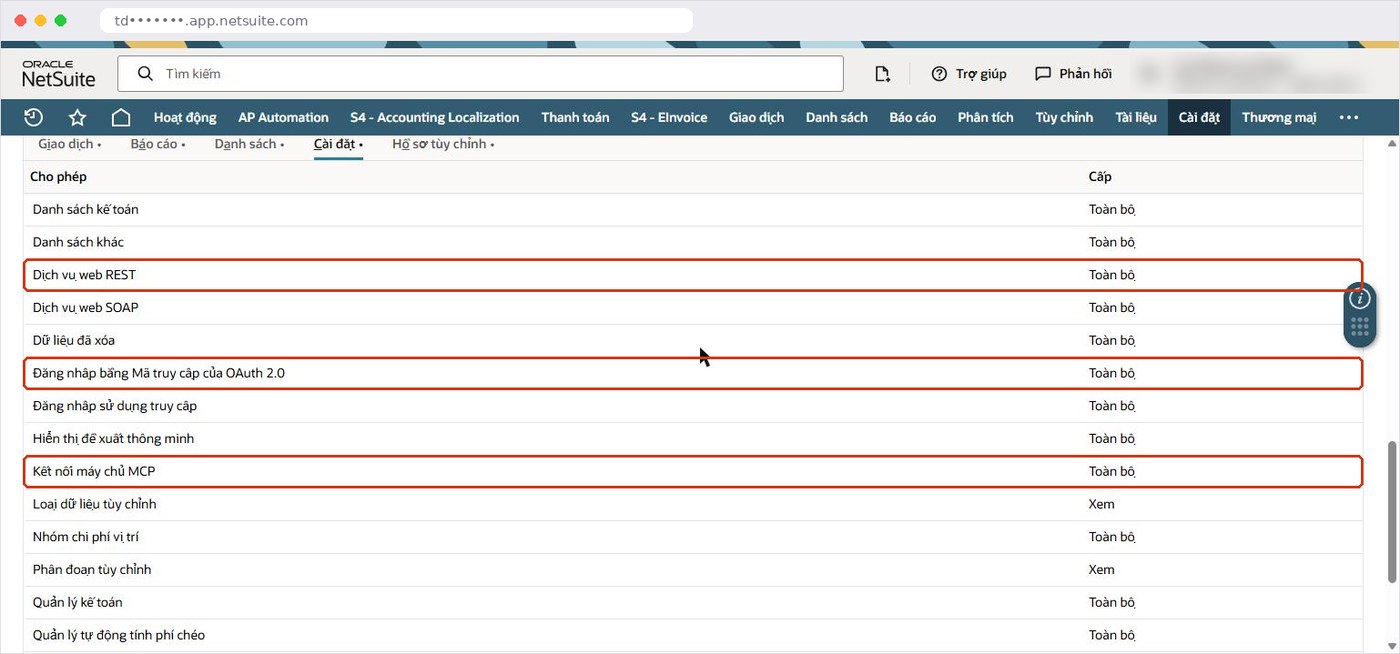
- Create a dedicated role for the AI connection. On the Permissions > Setup subtab, add MCP Server Connection and Log in using OAuth 2.0 Access Tokens, then grant only the transaction and list permissions that match the user’s job.
- Open each relevant employee record, go to the Access subtab and assign the new role.
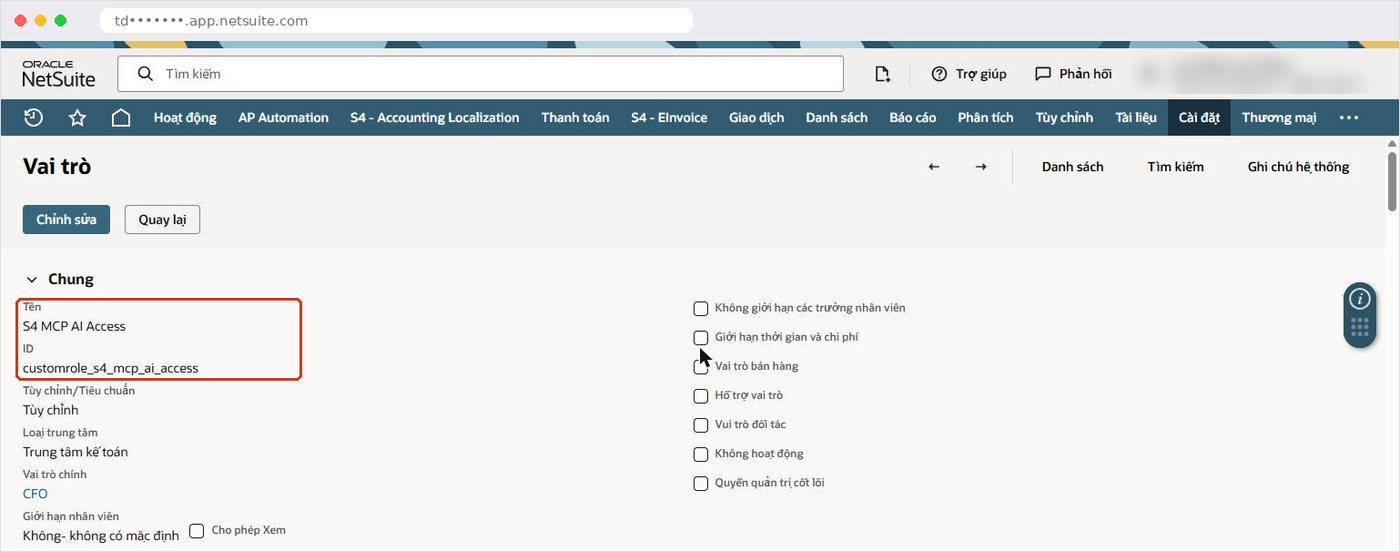
Step three is the one that counts. The AI can only do what the role allows, so the Create and Edit permissions on each transaction type are the real brakes. Do not use an administrator role for this; Oracle NetSuite blocks the Administrator role at sign-in anyway. In our experience, it is better to start with a narrow role for a small group and widen it as real needs emerge, rather than granting broad access on day one.
How does each user connect ChatGPT to Oracle NetSuite?
Each user finds the NetSuite app in ChatGPT, installs it, clicks connect, signs in to Oracle NetSuite, selects the dedicated role and clicks Allow.
- Find the Oracle NetSuite app for ChatGPT and confirm that the official page on openai.com lists Oracle NetSuite as the developer.
- In ChatGPT, open the app page, click install, then click connect.
- Sign in to Oracle NetSuite with your own account.
- Select the dedicated AI role your administrator assigned, not an administrator role.
- Read the consent screen and click Allow.
Take a moment on the consent screen. In the video it reads “ChatGPT wants to access … As role S4 MCP AI Access”, which means ChatGPT will access data and act strictly with the permissions of the S4 MCP AI Access role. If the role shown is not the one you expect, stop and sign in again. When an administrator changes the role’s permissions, users should disconnect and reconnect, choosing the correct role at the OAuth sign-in, so the new permissions take effect.
How did ChatGPT review the books before period close?
In the video, the user plays the chief accountant and asks ChatGPT to review October’s books for Sao Mai, a sample company in S4’s environment, before closing the period, with a clear instruction not to create or modify any transactions. ChatGPT runs its queries one after another, compares October with previous months and flags two issues: a negative cash-on-hand balance and journal entries without descriptions posted on a Sunday. Its conclusion is that the period should not be closed yet.
This is a sensible way to start: ChatGPT acts as a reviewer that points out what needs a second look, while the decision to close and any adjustments stay with the accounting team in Oracle NetSuite. The instruction “do not create or modify transactions” is worth including in every review request. It does not replace permissions, but it helps ChatGPT understand the scope of the task.
Why does ChatGPT return a 429 Too Many Requests error?
A 429 error means more requests reached Oracle NetSuite at the same time than the account allows. ChatGPT often runs several queries in parallel to answer faster, while Oracle NetSuite limits how many requests can run concurrently. In the video, when asked to create a purchase order, ChatGPT reported that the NetSuite connection was returning 429 Too Many Requests, so it could not look up data or record the order.
According to Oracle, if no dedicated concurrency limit has been set on the Integration Record, the AI Connector Service shares resources with other integrations and is bound by the portion of the account’s concurrency limit not allocated elsewhere. Each MCP tool call usually comes with additional protocol requests that also count toward the limit. The limit depends on the service tier and the number of SuiteCloud Plus licenses. The fix used in the video is simple:
- Add this to the end of your request: “Run each query one at a time, not in parallel, and if you hit a 429 error, wait a few seconds and try again.”
- On the administrator side, assign a dedicated concurrency limit on the Integration Record so the AI does not compete with running integrations.
- If the error keeps coming back, check which integrations consume most of the limit at peak times.
What should you ask ChatGPT about your Oracle NetSuite data?
Good requests state the period, the data scope and the format you want. OpenAI suggests several sample prompts on the app page; here they are adapted to a finance team’s context:
- Start with a check: “With my current role, which tools can I use and which data can I see?”
- Activity reports: ask for the reporting period, the source fields and any data excluded from the result.
- Investigating discrepancies: “Find the cause of the difference between these two records and list every related transaction.”
- Pre-close review: act as the chief accountant, compare with previous months, and do not create or modify transactions.
For official financial figures, Oracle recommends using standard reports and saved searches before SuiteQL. Even when an answer looks plausible, check it against the Oracle NetSuite report before using it for decisions or external reporting.
How do you control the risks of letting ChatGPT work with your ERP?
Control rests on three layers already in Oracle NetSuite: role permissions, transaction approval workflows and the execution log. Oracle is clear that NetSuite cannot fully eliminate prompt injection or model hallucination; it limits their impact. These layers therefore need to be designed from the start.
- Role permissions: Create and Edit rights decide whether ChatGPT can write data; never use the Administrator role or a full-access role.
- Approvals: in S4’s observation, transactions created by the AI, such as purchase orders, still go through the approval workflow configured in Oracle NetSuite.
- Logging: Execution Log > AI Connector Service (MCP) keeps tool-call history for 21 days in production and 7 days in sandbox.
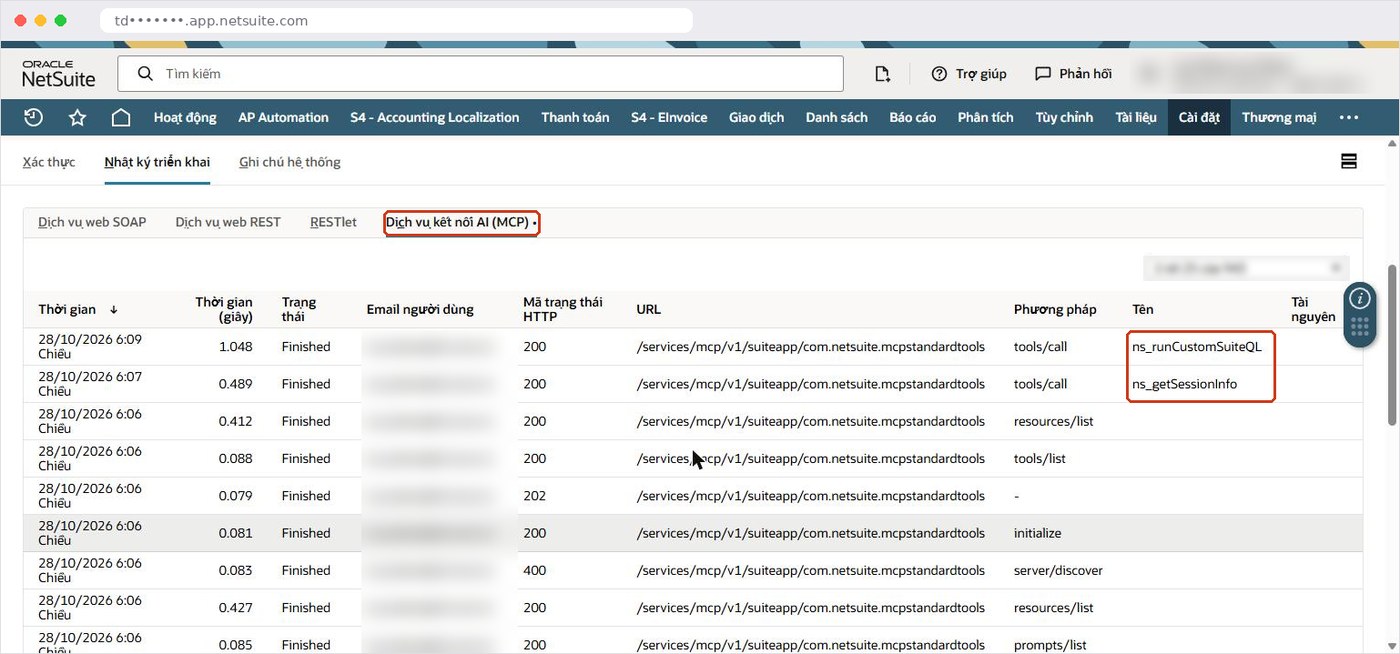
For a deeper look at security, data risk and responsibilities, see our guide to connecting Claude and ChatGPT to NetSuite securely. Companies in Vietnam using Oracle NetSuite financial localization for Vietnam should also confirm which local lists and statutory reports the AI role needs to see.
Should you choose ChatGPT, Claude or Copilot Studio for Oracle NetSuite?
All three connect through the NetSuite AI Connector Service and all run under Oracle NetSuite role permissions; the main differences are where users work and who sets things up. The table is only a starting point; the right choice usually follows the tools your team already uses every day.
| Criteria | ChatGPT | Claude | Copilot Studio |
|---|---|---|---|
| Connection | NetSuite app developed by Oracle NetSuite | Connects to the NetSuite AI Connector Service | Agent adds the MCP server, manual OAuth with an Integration Record |
| Who sets up the AI side | Each user installs it | See the dedicated guide | The agent builder in Copilot Studio |
| Where users work | ChatGPT app | Claude app | Microsoft Teams, Microsoft 365 Copilot |
| Data access | Oracle NetSuite role | Oracle NetSuite role | Oracle NetSuite role |
| Guide | This article | Claude and ChatGPT securely | Copilot Studio agent |
In our experience, many companies do not need to pick just one. Finance might use ChatGPT or Claude for analysis, while a Teams agent handles repeated questions from many staff, as long as each channel uses its own carefully designed role.
How can S4 Consulting help you connect ChatGPT to Oracle NetSuite?
S4 Consulting is an Oracle NetSuite consulting firm in Vietnam. We help design AI roles, review existing permissions, configure concurrency limits and coach finance teams on writing effective requests. For mid-size and large companies evaluating Oracle NetSuite in Vietnam, you can contact our team to discuss your setup.
Combining ChatGPT/Claude with Oracle NetSuite: practical tips to lighten the accounting workload
15:00-16:00 (Vietnam time), Friday 6 November 2026 on Microsoft Teams. Free; register in advance to receive the link.
The webinar on 6 November 2026 covers real accounting scenarios, how to phrase requests so ChatGPT and Claude stay on point, and how to avoid errors when working with larger data sets. You can register for the webinar and send your questions about your Oracle NetSuite account in advance.
Frequently asked questions
Which app connects ChatGPT to Oracle NetSuite?
The NetSuite app for ChatGPT, developed by Oracle NetSuite and listed on openai.com. It runs on the NetSuite AI Connector Service, supports MCP and keeps Oracle NetSuite role-based security.
Can I connect ChatGPT to Oracle NetSuite on the free plan?
In S4’s video, the connection works on the free ChatGPT plan. OpenAI notes that availability depends on the app, your plan and workspace settings, and some connections need administrator approval.
Can ChatGPT create or change data in Oracle NetSuite?
ChatGPT queries, creates or updates data according to the permissions of the role selected at sign-in. Create and Edit permissions control writing, and created transactions still go through approval workflows.
How do I avoid 429 Too Many Requests errors?
Ask ChatGPT to run queries one at a time, not in parallel, and to wait a few seconds and retry on a 429 error. Administrators can also set a dedicated concurrency limit on the Integration Record.
Can I use the Administrator role for the ChatGPT connection?
No. Oracle NetSuite blocks the Administrator role at sign-in. Create a dedicated role with MCP Server Connection and Log in using OAuth 2.0 Access Tokens permissions.
References
- OpenAI - NetSuite plugin for ChatGPT (developer: Oracle NetSuite)
- Oracle NetSuite Help - NetSuite AI Connector Service and Concurrency Governance
- Oracle NetSuite Help - Required Features and Permissions (NetSuite AI Connector Service)
- Oracle NetSuite Help - Installing the MCP Standard Tools SuiteApp
- Oracle NetSuite Help - Associated Risks, Controls, and Mitigation Strategies