


Claude NetSuite connector: admin setup, user connection and the MCP server URL
Written by the S4 Consulting ERP and AI team · Updated 31 Oct 2026
The Claude NetSuite connector lets Claude connect directly to Oracle NetSuite, so it can query, create, update or delete data depending on the role the user picks at sign-in. Setup has two parts: the Oracle NetSuite administrator prepares the account once for the whole company, and each user then adds the connector in Claude and signs in with a dedicated role. This article separates those two jobs clearly, explains the official and custom connector options, shows the MCP server URL pattern, and summarizes what finance teams did with the connection in S4’s video.
The video is under four minutes, so you can watch the video and follow the screens alongside this article. For a deeper discussion of security and data risk when AI tools touch your ERP, our step-by-step article on connecting Claude and ChatGPT to NetSuite securely covers the governance side. Here we focus on who does what and how to get the connector working.
What does the Claude NetSuite connector do?
The Claude NetSuite connector gives Claude live access to Oracle NetSuite through the NetSuite AI Connector Service, which uses the Model Context Protocol (MCP). Claude can answer questions with live figures, build reports and, if the role allows, create or update records. Every call runs under the permissions of the Oracle NetSuite role chosen at sign-in, so the role is the real control. According to Oracle, the AI Connector Service is not a paid add-on and the MCP Standard Tools SuiteApp is free.
When recording the video, the S4 team connected Claude to its own Oracle NetSuite account with a dedicated AI role and a sample company, and checked the role line on the consent screen each time. We saw the integration record appear after the first connection, which made it easy for the administrator to follow status and usage. In the e-invoice case, Claude proposed the vendor bill and waited for confirmation, which is the working style we recommend whenever a role allows creating records.
Who does what: administrator or user?
The administrator works once in Oracle NetSuite; each user works in Claude. Keeping the split clear avoids the most common delays, such as users trying to connect before the role exists.
| Area | Oracle NetSuite administrator | User |
|---|---|---|
| Where | Oracle NetSuite | Claude (Settings > Connectors or the chat box) |
| How often | Once for the company, revisited when permissions change | Once per user |
| Main tasks | Enable features, install MCP Standard Tools, create and assign the AI role | Add the connector, paste the MCP server URL, sign in, pick the role |
| Provides | Account ID and MCP server URL | Questions and confirmation before saving records |
| Monitors | Integration record status and usage, execution log | Results before using them |
What does the administrator prepare once?
The administrator completes the same four steps used for every AI connection to Oracle NetSuite:
- Setup > Company > Enable Features, SuiteCloud tab: turn on Server SuiteScript, OAuth 2.0 and REST Web Services, then save.
- SuiteApps: search for MCP Standard Tools and install it.
- Create a dedicated AI role. Under Setup permissions add MCP Server Connection and Log in using OAuth 2.0 Access Tokens, then grant the transaction and list permissions that match the job.
- Assign the role on each user’s employee record, Access tab.
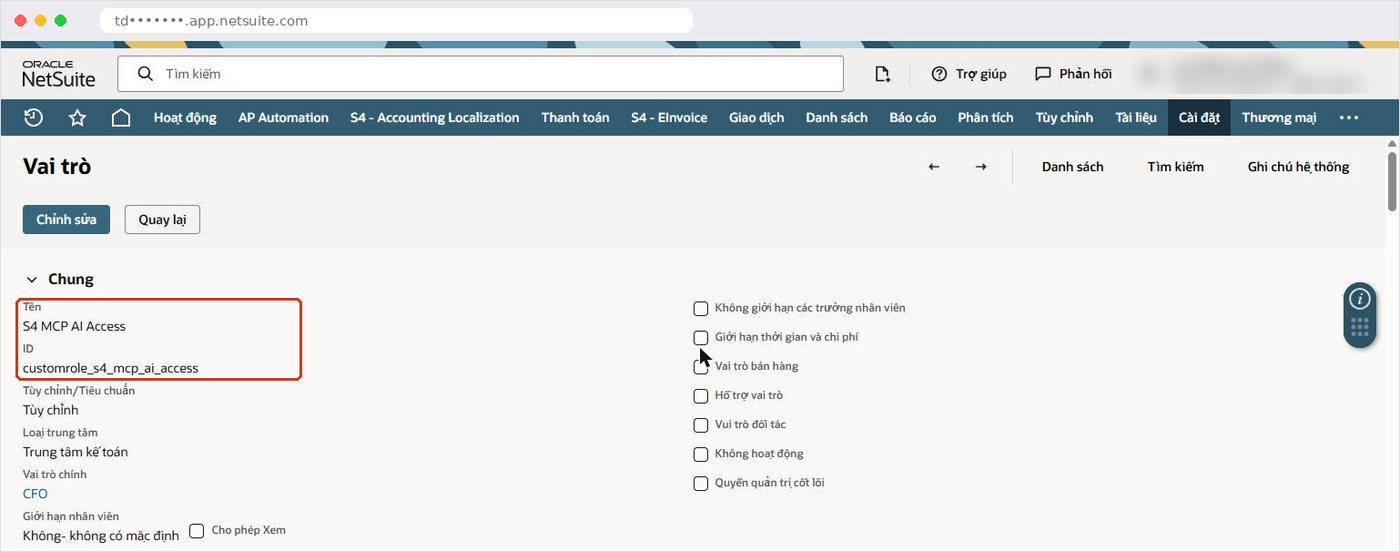
The AI can only do what this role allows, and full-access or Administrator roles are not allowed for this connection. In our experience, starting with a narrow role and widening it as real needs appear is easier than taking permissions away later.
Official or custom Claude NetSuite connector: which should you use?
Use the official connector when it is available in your Claude account, and a custom connector when it is not or when your company needs a specific server URL. Both end in the same Oracle NetSuite sign-in and role selection.
For the official connector, open Settings > Connectors in Claude, find NetSuite, click Connect, paste the MCP server URL from your administrator and sign in.
For a custom connector, click “+” in the chat box, then Connectors > Add connector > Add custom connector. There are two fields:
- Name: anything your team will recognize, for example the company or environment name.
- MCP server URL: the URL your administrator gives you, built from your company’s account ID.
Then click Continue, Connect, sign in to Oracle NetSuite, pick the dedicated role rather than Administrator, and click Allow.
What is the NetSuite MCP server URL for Claude?
The MCP server URL follows a fixed pattern with your company’s account ID in place of ACCOUNTID. Your administrator provides both the account ID and the final URL.
- Standard tools: https://ACCOUNTID.suitetalk.api.netsuite.com/services/mcp/v1/suiteapp/com.netsuite.mcpstandardtools
- All tools, if the company has custom tools: https://ACCOUNTID.suitetalk.api.netsuite.com/services/mcp/v1/all
Most companies start with the standard tools URL. The second pattern matters only when your team has built custom tools in addition to MCP Standard Tools. Treat the account ID as internal information and share it only with the users who need it.
What happens the first time a user connects?
On the first connection, NetSuite creates an integration record, and the administrator can watch its status and usage under Manage Integrations. Before that, the user sees a consent screen showing which role Claude will act as.
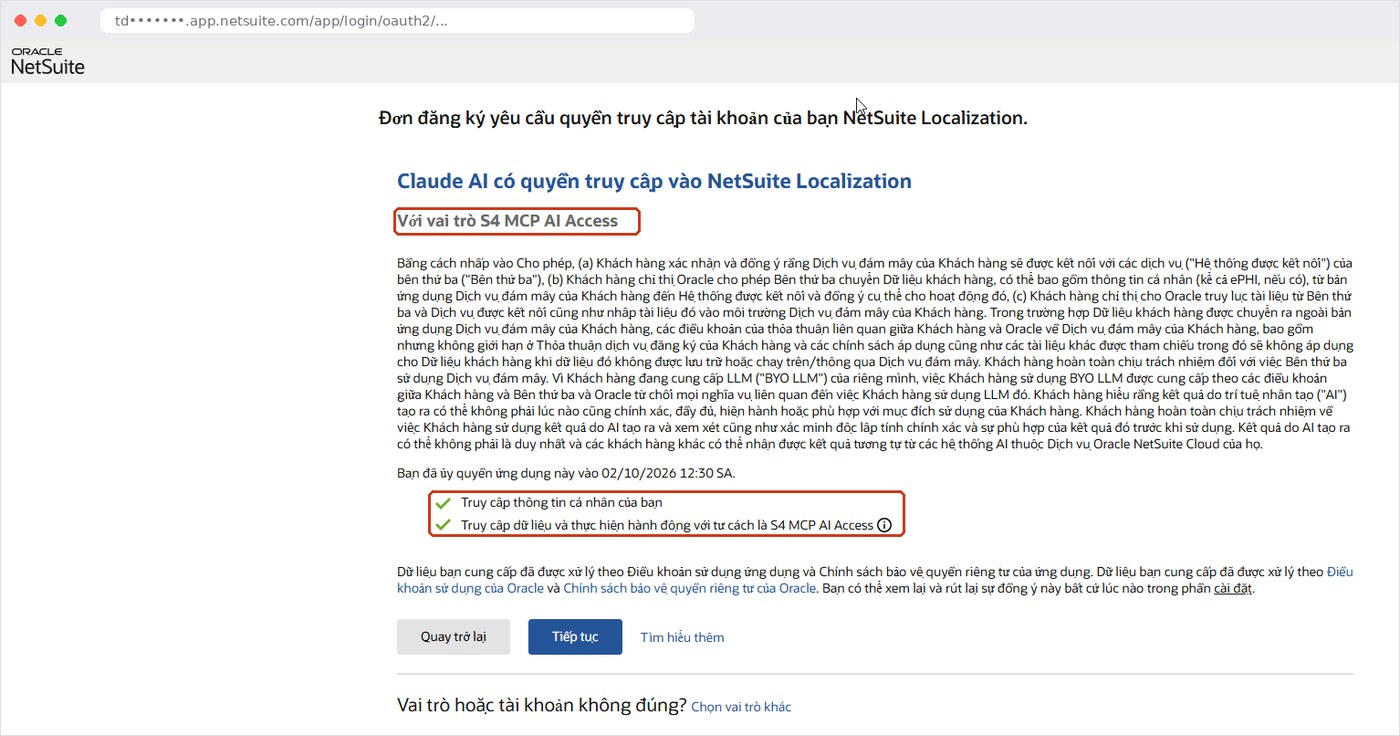
Read the role line on that screen before clicking Allow. If it is not the dedicated AI role, stop and sign in again. When an administrator changes the role’s permissions later, users should disconnect and reconnect, choosing the right role, so the changes apply.
Does ChatGPT connect to NetSuite the same way?
Yes, the pattern is the same. In ChatGPT, open Apps, search for NetSuite, click Connect, sign in and choose a role other than Administrator. If there is no official connector in your workspace, create a custom one with the same server URL; for that new connection, the administrator must enable the integration record. The free plan behavior and the 429 error that ChatGPT users often meet are covered in our article on the NetSuite app for ChatGPT.
What can finance teams do with Claude and NetSuite?
The video shows four practical uses on a sample company. They are examples of the pattern, not promises of results on every account.
- A year-to-date P&L dashboard built from live Oracle NetSuite figures.
- A cash and receivables question where Claude found a cash account that went negative during the month, although the closing balance does not show it.
- An accounts payable report produced from a single question.
- A PDF e-invoice uploaded to Claude: it reads the invoice, checks the buyer details and proposes a vendor bill for the user to confirm before saving.
The second case is worth noting for controllers. A month-end balance can look fine while the account went negative for some days in between, and a question that asks for daily movement can surface that quickly. The e-invoice case shows the right working style for writing data: Claude proposes, the user confirms, and only then is the record saved.
How do skills keep Claude’s answers consistent with company policy?
Administrators can write skills, which are shared instruction files that every user’s Claude follows. In the video the example is an expense report skill that contains the posting rules, the required documents and the approvers. With it, every user gets consistent results that follow internal policy, instead of each person describing the rules differently in their own prompts. Skills do not replace role permissions; they guide how Claude works inside the limits the role already sets.
What controls should be in place before rolling out?
Controls rest on what Oracle NetSuite already provides. Oracle states that NetSuite cannot eliminate prompt injection or hallucination, only limit their impact, so plan these from the start:
- A dedicated role per use case, with Create and Edit granted only where needed.
- User confirmation before Claude saves any record.
- Standard reports and saved searches preferred over ad hoc SuiteQL for official financials, as Oracle recommends.
- Regular checks of Execution Log > AI Connector Service (MCP), kept for 21 days in production and 7 days in sandbox.
What other ways can you connect AI to Oracle NetSuite?
Claude is one of several options. Companies standardized on Microsoft 365 often prefer a shared agent in Teams, described in our guide to a NetSuite AI agent in Microsoft Teams. Teams that need automated, scheduled workflows rather than chat can look at our article on ERP integration with n8n and AI assistants.
How can S4 Consulting help with the Claude NetSuite connector?
S4 Consulting is an Oracle NetSuite consulting firm in Vietnam. We help mid-sized and large companies design AI roles, prepare MCP server URLs and integration records, write skills that reflect internal policy and train finance users. For an overview of the platform see our Oracle NetSuite ERP page, or contact S4 Consulting to discuss your setup.
Set up the Claude NetSuite connector with the right roles
S4 Consulting can prepare your AI roles, MCP server URLs and integration records, and help your administrators write skills that follow internal policy.
Frequently asked questions
What does the Claude NetSuite connector do?
It connects Claude to Oracle NetSuite through the NetSuite AI Connector Service with MCP. Claude can query, create, update or delete data, but only as far as the role chosen at sign-in allows.
What is the MCP server URL for Oracle NetSuite?
It follows https://ACCOUNTID.suitetalk.api.netsuite.com/services/mcp/v1/suiteapp/com.netsuite.mcpstandardtools for standard tools, or …/services/mcp/v1/all with custom tools. Your administrator provides the account ID and URL.
Should I use the official or a custom connector?
Use the official connector in Settings > Connectors when it is available. Otherwise add a custom connector with a name and the MCP server URL; both end in the same NetSuite sign-in.
Where can the administrator see Claude connections?
NetSuite creates an integration record on the first connection. The administrator can follow its status and usage under Manage Integrations and review the AI Connector Service execution log.
Can I sign in with the Administrator role?
No. Full-access and Administrator roles are not allowed. Use a dedicated role with MCP Server Connection and Log in using OAuth 2.0 Access Tokens permissions.
References
- Oracle NetSuite Help - Connect to the NetSuite AI Connector Service
- Oracle NetSuite Help - Required Features and Permissions (NetSuite AI Connector Service)
- Oracle NetSuite Help - NetSuite AI Connector Service FAQ
- Oracle NetSuite Help - NetSuite AI Connector Service
- Oracle NetSuite Help - Best Practices for MCP Standard Tools SuiteApp