


NetSuite app for ChatGPT: free plan, error 429 fix and month-end review prompts
Written by the S4 Consulting ERP and AI team · Updated 31 Oct 2026
The NetSuite app for ChatGPT is the official app built by Oracle NetSuite that lets ChatGPT connect directly to your Oracle NetSuite account, so finance users can ask for figures, review the books and work with ERP data in plain language. In S4’s video the connection works even on the free ChatGPT plan, and the most common problem users meet is error 429 Too Many Requests. This article explains what the app is, what the free plan means in practice, why error 429 happens, the exact instruction to paste into ChatGPT, and what NetSuite administrators can change on their side.
The video runs just under three minutes, so you can watch the video first and then come back here for the reasoning behind each step. If you want a screen-by-screen walkthrough of the setup itself, our step-by-step article on how to connect ChatGPT to Oracle NetSuite covers it in detail. This page takes a different angle: it is written for the administrator who has to keep the connection stable and for the users who want useful, trustworthy answers.
What is the NetSuite app for ChatGPT?
The NetSuite app for ChatGPT is an official plugin whose listed developer on openai.com is Oracle NetSuite, not a third-party vendor. According to the OpenAI page, it is built on the NetSuite AI Connector Service with the Model Context Protocol (MCP) and keeps the role-based security that Oracle NetSuite already enforces. In practice this means ChatGPT does not receive a password or a static key. Each user signs in to Oracle NetSuite, chooses a role, and every query or action ChatGPT runs stays inside that role’s permissions.
Oracle’s documentation also clarifies two cost questions that IT leads usually ask first. The AI Connector Service is not a paid add-on, and the MCP Standard Tools SuiteApp, which provides the standard tools the AI uses, is free to install. Your existing Oracle NetSuite licensing and your ChatGPT plan are what matter.
When recording the video, the S4 team connected from a free ChatGPT account using a dedicated AI role, never Administrator, and read the role line on the consent screen before clicking Allow. We noticed that ChatGPT tends to send several queries at once on multi-step requests such as a month-end review, which is the situation where error 429 is most likely, and the one-at-a-time instruction is the approach we use to keep those runs orderly. Results on other accounts may differ depending on plan, workspace settings and concurrency.
Does the NetSuite app work on the free ChatGPT plan?
In S4’s video, the connection works on the free ChatGPT plan. Paid ChatGPT plans give a higher query allowance and smarter models, which helps when users run longer analyses or use the connection every day. OpenAI notes, however, that availability depends on the plugin, your plan and your workspace settings, and that some connections need an administrator to set them up or approve them. We therefore do not promise that every free account will work. The reliable approach is to check in your own ChatGPT account and, for business workspaces, to ask the workspace administrator whether the NetSuite plugin is allowed.
What does the administrator set up before users connect?
The Oracle NetSuite administrator prepares the account once for the whole company in four steps. Users cannot connect until these are done.
- Go to Setup > Company > Enable Features, SuiteCloud tab, turn on Server SuiteScript, OAuth 2.0 and REST Web Services, then save.
- Open SuiteApps, search for MCP Standard Tools and install it.
- Create a dedicated AI role. Under Setup permissions add MCP Server Connection and Log in using OAuth 2.0 Access Tokens, then grant only the transaction and list permissions that match the job.
- Assign the role on each user’s employee record, Access tab.
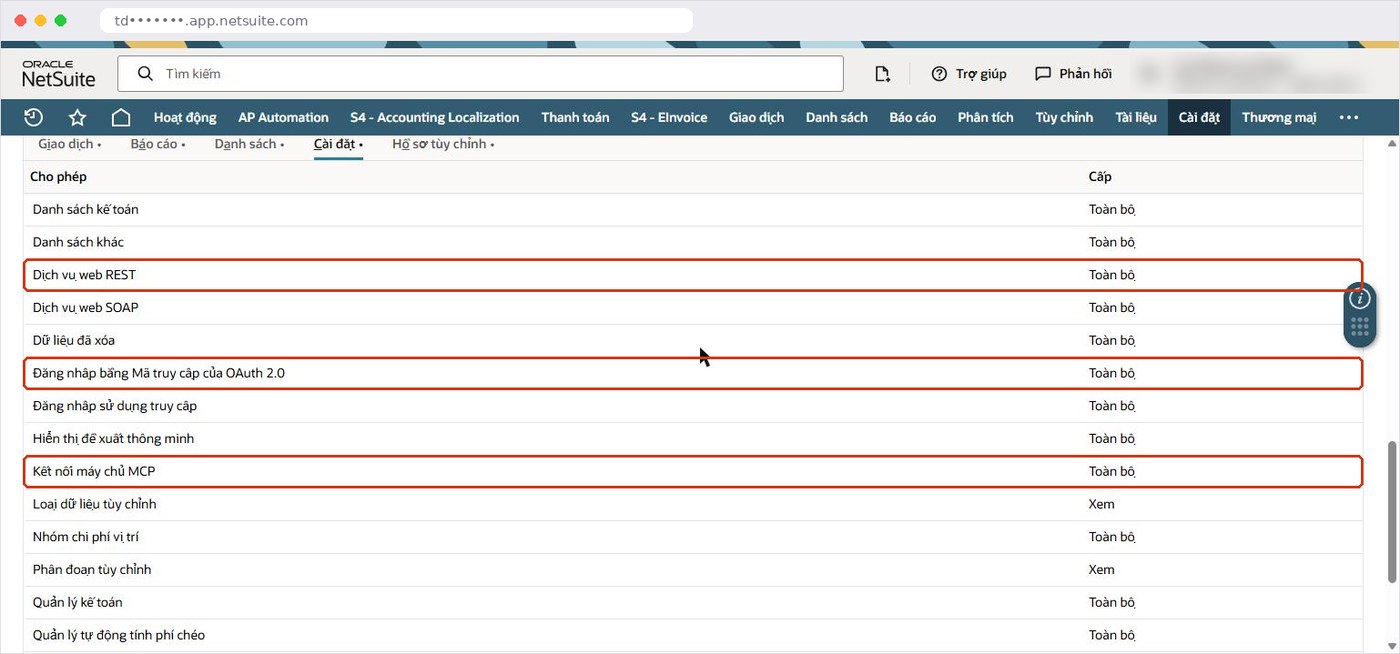
The third step decides what ChatGPT can do. The AI can only do what this role allows, so never use Administrator; Oracle NetSuite does not allow full-access roles for this connection anyway. In our experience, a narrow role for a small group of users is the safer starting point.
How does a user connect the NetSuite app inside ChatGPT?
Each user installs the app from inside ChatGPT, signs in to Oracle NetSuite and picks the dedicated role. The flow shown in the video is:
- Find the NetSuite app for ChatGPT and confirm on the official openai.com page that the developer is Oracle NetSuite.
- In ChatGPT, open the app page, click Install plugin, then Connect.
- Sign in to Oracle NetSuite and pick the dedicated AI role, not Administrator.
- Read the consent screen, which says ChatGPT will access data and take actions with exactly that role’s permissions, then click Allow.
If an administrator later changes the role’s permissions, Oracle recommends disconnecting and reconnecting, choosing the correct role again, so the new permissions apply.
Why does ChatGPT hit error 429 Too Many Requests in NetSuite?
Error 429 appears because ChatGPT often fires several queries in parallel to answer faster, while Oracle NetSuite limits how many requests can run at the same time. When too many arrive together, NetSuite rejects the extra ones with 429 Too Many Requests, and ChatGPT may report that it cannot read the data.
Oracle’s documentation on concurrency governance explains the mechanics. If no dedicated concurrency limit is assigned on the integration record, the AI Connector Service shares the account’s unallocated concurrency with every other integration. Each MCP tool call can also carry extra protocol requests, so one question from a user may count as more than one request. The overall limit depends on your service tier and SuiteCloud Plus licenses, which is why two companies can see very different behavior with the same prompt. A busy integration running at the same time as a ChatGPT session makes the error more likely.
What instruction fixes error 429 for ChatGPT users?
The fix shown in the video is a single sentence added to the request. Users can paste it at the end of any prompt that needs several queries:
- “Run the queries one at a time, never in parallel, and if a 429 appears, wait a few seconds and run that query again.”
This works because it removes the burst of parallel requests that causes the error and gives ChatGPT a clear retry rule. Answers may take a little longer, but they arrive in order and the review does not stop halfway. Finance teams that use the connection often can keep this sentence in a saved prompt so nobody has to remember it.
What can NetSuite administrators do about error 429?
Administrators can reduce the error at the source rather than relying only on user prompts. The table below separates the two sides.
| Who | What to do | Why it helps |
|---|---|---|
| User | Add the one-at-a-time instruction to multi-query prompts | Removes parallel bursts from ChatGPT |
| Administrator | Assign a dedicated concurrency limit on the integration record | The AI no longer competes for the shared, unallocated pool |
| Administrator | Check which other integrations run at peak times | Frees capacity that the AI session needs |
| Administrator | Review service tier and SuiteCloud Plus licenses with your account team | These determine the account’s total concurrency |
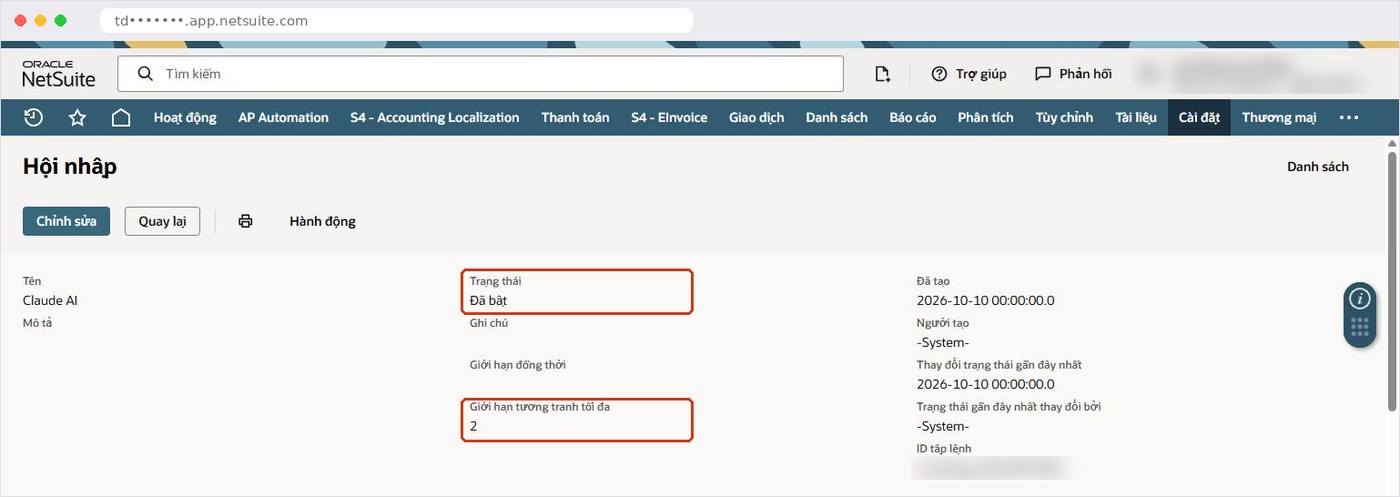
We do not publish specific limit numbers here because they vary by account. The right value is a balance between what the AI needs and what your other integrations, such as e-commerce or banking connections, must keep.
Which prompts work well for a month-end review?
The most useful prompts give ChatGPT a role, a period, a scope and a clear boundary. The example in the video is: “act as the chief accountant, review October’s books for a sample company before closing the period, and do not create or change any transaction”. ChatGPT then ran its queries one by one, compared October with earlier months, flagged a cash account that went negative and journal entries posted on a Sunday without memos, and advised not to close the period yet.
Other prompts in the same spirit that finance teams can adapt:
- “Before we close the month, list any accounts whose balance changed sign compared with the previous three months.”
- “Show journal entries posted on weekends or without a memo for this period, and do not change anything.”
- “Compare this month’s expense totals by department with the average of the last quarter and explain the largest differences.”
The instruction not to create or change transactions is worth keeping in every review request. It does not replace role permissions, but it tells ChatGPT the scope of the task clearly.
What should you check before trusting ChatGPT’s answers?
Treat ChatGPT as a reviewer that points to what needs a second look, not as the source of official figures. Oracle states that NetSuite cannot eliminate prompt injection or hallucination; it can only limit their impact. A short checklist helps:
- Compare key totals with the standard Oracle NetSuite report or saved search, which Oracle recommends over ad hoc SuiteQL for official financials.
- Confirm the period and subsidiary ChatGPT actually queried.
- Ask ChatGPT which records it used when a number looks surprising.
- Check the Execution Log > AI Connector Service (MCP), kept for 21 days in production and 7 days in sandbox, if you need to see what was run.
For a fuller discussion of data risk and responsibilities, see our guide to connecting Claude and ChatGPT to NetSuite securely. Companies in Vietnam should also confirm which local lists and statutory reports from Oracle NetSuite financial localization for Vietnam the AI role needs to see.
How does the ChatGPT app compare with Claude and Copilot Studio?
All three use the same administrator preparation and run under an Oracle NetSuite role; they differ in where users work and who configures the AI side. Claude users add a connector with an MCP server URL, which we explain in the Claude NetSuite connector guide. Companies on Microsoft 365 can build a shared agent instead, as shown in our article on a NetSuite AI agent in Microsoft Teams. In our experience, many teams use more than one, each with its own carefully designed role.
How can S4 Consulting help with the NetSuite app for ChatGPT?
S4 Consulting is an Oracle NetSuite consulting firm in Vietnam. We help mid-sized and large companies design AI roles, review existing permissions, set concurrency limits on integration records and coach finance teams on prompts for period-end reviews. If you are still evaluating the platform, our Oracle NetSuite ERP page gives an overview, and you can contact S4 Consulting to discuss your account.
Make the NetSuite app for ChatGPT stable for your finance team
S4 Consulting can review your AI roles, concurrency settings and integration records, and help your team write reliable month-end review prompts.
Frequently asked questions
What is the NetSuite app for ChatGPT?
It is the official plugin listed on openai.com with Oracle NetSuite as the developer. It is built on the NetSuite AI Connector Service with MCP and keeps Oracle NetSuite role-based security.
Does the NetSuite app work on the free ChatGPT plan?
In S4’s video it works on the free plan. OpenAI notes that availability depends on the plugin, your plan and workspace settings, and some connections need an administrator to set up or approve them.
Why do I get error 429 Too Many Requests?
ChatGPT often sends several queries in parallel, and Oracle NetSuite limits concurrent requests. Without a dedicated limit, the AI Connector Service shares the account’s unallocated concurrency with other integrations.
What should I type to avoid error 429?
Add: “Run the queries one at a time, never in parallel, and if a 429 appears, wait a few seconds and run that query again.” Administrators can also set a dedicated concurrency limit on the integration record.
Can I use the Administrator role with ChatGPT?
No. Create a dedicated AI role with MCP Server Connection and Log in using OAuth 2.0 Access Tokens permissions, plus only the transaction and list permissions the job needs.
References
- OpenAI - NetSuite plugin for ChatGPT (developer: Oracle NetSuite)
- Oracle NetSuite Help - NetSuite AI Connector Service and Concurrency Governance
- Oracle NetSuite Help - Required Features and Permissions (NetSuite AI Connector Service)
- Oracle NetSuite Help - Installing the MCP Standard Tools SuiteApp
- Oracle NetSuite Help - Associated Risks, Controls, and Mitigation Strategies